Urban Dictionary, and I think it's safe to say we're all familiar with this concept. Dogfooding is generally regarded as a good thing since it allows developers to experience customer pains first hand. But dogfooding has another side beyond just development. What happens when when through the process of dogfooding you become one of your own largest customers? How do you balance your own needs against those of the rest of your customers? And how do you get your developers in a mindset where they are focused externally and not just internally?
According to Lotus sources about half of Domino's customer base is SMB. I have seen different people from Lotus define that as 1000 user and 5000 users. There is a tremendous problem with this definition. I've discussed it before, but it's relevant to this conversation. According to the US Small Business Administration SMB's may vary from 100 to 1500 employees depending on the industry. The average works out to 500. The European Union defines a SMB as under 400 employees. More importantly, SMB's employ over 97% of the people in the US and account for over 99% of the businesses. IBM's definition is so far out of line with the rest of the world it's absurd, and this disconnect is the source of a lot of their perception problems.
When adding functionality to the Lotus product line IBM's focus is on big companies and large environments because they are one. First and foremost they have to make sure their tools work for themselves. I get that and it's certainly understandable, it's just being done in a way that has alienated a large portion of their customers: the SMB's.
Since IBM took over Lotus the evolution of the product set has been schizophrenic. From a "two lane highway" message to spinning off a competing product line (Workplace), to mostly dismantling that effort and assigning that product's name as the overarching "strategy" moniker for all messaging and collaboration products -- it's been a real rollercoaster. It's been almost as difficult to keep up with as the renaming of the server lines that happens every few years. (It'll always be an AS/400 dammit!)
After Workplace was largely disbanded as a product line portions of it started appearing under the guise of Domino functionality. All of a sudden we started hearing about integrating Activity Explorer with Notes. Workplace Designer was rebranded as Lotus Component Designer and would allow consumption of Domino data with either a Notes client or web interface. In separate news the Sametime Realtime Community Gateway was going to allow federation to several popular public IM networks. The Domino community rejoiced. We were finally first-class citizens alongside the Websphere crowd! Then the other shoe dropped.
None of the new functionality uses Domino. Activity Explorer is deployed on Websphere and DB2. The Sametime RTC Gateway is as well. Lotus Component Designer can't deploy to Domino, you have to deploy to Websphere Portal. The only real interface is web-based, but you can wire it into a composite application in Notes 8 -- provided you use the Standard (Eclipse-derived) client, which comes with its own huge list of caveats. The early buzz changed to cries of outrage.
IBM kept trying to spin all this positively. The justification given for Activity Explorer and the Sametime RTC Gateway using a non-Domino underpinning is scalability. Allowing two different backends was considered, but written off as too expensive. During the discussion about the Sametime RTC Gateway we were told it had to scale to "carrier grade deployments" of the VoIP integration. Okay, I'll bite. How many SMB's out there (by a standard definition and not IBM's) are telecommunications carriers? If there are any, how many are deploying Sametime for VoIP?
Someone at IBM finally realized that SMB's couldn't afford Websphere Portal so IBM released Websphere Portal Express. It promises under 60 minutes installation time and a more attractive price point. I've not installed it so I can't comment on that, but the price I saw was $40,000. If that's more affordable I'm glad I don't know what the non-Express version costs. It shows yet another disconnect between IBM and their customers.
Just when I thought the news for SMB's couldn't get any more depressing, at Lotusphere 2007 Mike Rhodin announced Connections. There is a lot of compelling functionality and I was really excited about it, so I went on a fact finding mission. I wanted to know how it is licensed and how is it deployed. It's been three months since Lotusphere and there is no information on the Connections site so I started contacting people inside Lotus. So far I've been through four contacts and as soon as I say "about 200 users" my phone calls and e-mails aren't returned. I don't take the dismissal personally, but it does tell me that Connections isn't intended for SMB's.
Coming full circle, I think in this case dogfooding has hurt IBM. They are releasing exciting products with amazing features and functionality. They're just doing so on an infrastructure that's too heavy for the average SMB to justify, and at a price point that's unreachable for them as well. I encourage IBM to continue the practice of dogfooding, but I also encourage them to use the experience wisely. Let the developers fix the things they find wrong. Listen to all your customers and do the things they ask you to. Don't be afraid to try another flavor, possibly something in the "lean" or "light" area, or different packaging. Hint: licensing (i.e. "Express") doesn't go far enough.
N.B. I intentionally left out links to references to protect both the innocent and the guilty.
Saturday, April 14, 2007


Friday, April 13, 2007
Dining With Friends - Greek Menu is set
We finalized the menu last weekend:
From here I take the recipes and retype them into a more friendly format, multiplying out the ingredients as I go. Then I take all the ingredients, plug them into Excel, and add it all up to get a total of quantities across all the dishes. That gives us our master shopping list. Then I figure out when the various components need to be done and work out a schedule for what gets done when. It's a lot of prep work and coordination, but it's fun.
In case you missed my original post the party is on Saturday, May 5th. If you want to visit Charleston, SC, drop me a line and I'll give you the address. :-)
- Marinated Meatballs
- Spinach Pie
- Eggplant Moussaka
- Beet Salad
- Tomato and Cucumber Salad with Feta Cheese
- Lamb with Orzo
- Baked Lima Beans
- Greek Chicken
- Greek Potatoes
- Plaki
- Dolmades
- Assorted olives
From here I take the recipes and retype them into a more friendly format, multiplying out the ingredients as I go. Then I take all the ingredients, plug them into Excel, and add it all up to get a total of quantities across all the dishes. That gives us our master shopping list. Then I figure out when the various components need to be done and work out a schedule for what gets done when. It's a lot of prep work and coordination, but it's fun.
In case you missed my original post the party is on Saturday, May 5th. If you want to visit Charleston, SC, drop me a line and I'll give you the address. :-)
Wednesday, April 11, 2007
note to self...
When moving an existing Domino server from one piece of hardware to another, be sure to disable or deactivate the old IP. It saves you lots of time tearing your hair out because the connectivity is sporadic. :-p


SNTT - Installing and configuring ODBC drivers for Domino on Red Hat Enterprise Linux
This has been a long time coming, but I'm finally ready to move my Domino application server to Linux. Nearly every application I've written in Notes uses LC LSX to access data from our iSeries ERP server. My current Domino application server is also an an iSeries, so I can use the native DB2 connectivity built in. For Linux I need to configure ODBC, and I really didn't relish the idea of going through all the previous hell from my proof of concept.
Environment variables in RHEL are kept in the file /etc/profile and you have to be logged in as root to modify it. I always log into my RHEL servers with my Notes user account, so I go to a Terminal prompt and use su to switch to the root user. Then I type gedit /etc/profile to open the file in the Gnome Editor, which I like a billion times better than vi. In the profile file you will see a line like this:
export PATH USER LOGNAME MAIL HOSTNAME HISTSIZE INPUTRC
Add the following before this line:
LANG=C
export LANG
ODBCINI = /opt/odbc/odbc.ini
LD_LIBRARY_PATH=/opt/ibm/lotus/notes/latest/linux:/opt/odbc:/opt/odbc/lib
NUI_NOTESDIR=/opt/ibm/lotus
LOTUS=/opt/ibm/lotus/
Notes_ExecDirectory=/opt/ibm/lotus/notes/latest/linux/
LIBPATH=$Notes_ExecDirectory
export ODBCINI LD_LIBRARY_PATH NUI_NOTESDIR LOTUS Notes_ExecDirectory
export LIBPATH
PATH=$PATH:/opt/ibm/lotus/notes/latest/linux/res/$LANG:/$Notes_ExecDirectory
PATH=$PATH:/local/notesdata
I split the export and PATH lines for readability, you can certainly put them all one line if you like. Following the second PATH line above should be the default export line I listed previously. When you're finished, save and close the profile file.
Next up, configuring the ODBC driver. All the configuration is done in the odbc.ini file, which if you were paying attention you might have guessed is in /opt/odbc. Edit the file by using gedit /opt/odbc/odbc.ini . The odbc.ini file is divided into several sections. The [ODBC Data Sources] section lists all the configured system DSN's that can be used. It's generally a good idea to leave all the defaults alone and add what you need. In my case I'm adding a DB2 DSN called LOCAL, so mine looks like this:
[ODBC Data Sources]
LOCAL=IBM Lotus OEM 5.2 DB2 Wire Protocol
DB2 Wire Protocol=IBM Lotus OEM 5.2 Wire Protocol
...
The next step is to configure your DSN. You do this by copying the section for your type of driver, renaming it, then updating the parameters. Since I'm using the DB2 Wire Protocol driver, I copied the [DB2 Wire Protocol] section, then pasted it back into the same file, giving me two copies of the same section. Then I renamed the one I pasted.
[LOCAL]
Driver=/opt/odbc/lib/LOdb222.so
Description=IBM Lotus OEM 5.2 DB2 Wire Protocol
....
Tip: If you're connecting from RHEL to DB2 on an iSeries, make sure you do the following:
add # before the Database= line
IpAddress=your iSeries IP
Location=iSeries DB name from WRKRDBDIRE
TcpPort = 446 (that's the default, check with your iSeries admin if it doesn't work)
Save and close the odbc.ini file when you're finished. From the command prompt you used to edit the file, issue the command source /etc/profile . This will reload /etc/profile, updating the environment variables.
You can test your connection by executing /opt/ibm/lotus/notes/latest/linux/dctest. At the first prompt enter option 3 to select an ODBC connection, then enter the name of your DSN. If you get errors about files not existing you may want to try restarting the server, or at least logging off and back on again.
Getting the DataDirect 5.2 drivers
I contacted Lotus support to see if there was a more recent version of the DataDirect ODBC drivers than the 5.1 version and layers of hotfixes I used previously. The good news is there is a newer release! The Lotus OEM branded DataDirect 5.2 drivers are included with Domino 6.5.6, which was released on March 27, 2007. However they are not available as a stand-alone download. You have to install the server to get them, and you must select the Enterprise server. Even then the drivers aren't installed, they're just extracted from the installation image.Installing the drivers
Now that you've installed Domino 6.5.6 Enterprise you have to track down the drivers. They're in /opt/lotus/notes/6560/linux/, and you install them by executing the file EIODBClinux and following the on screen prompts. The rest of this documentation assumes you accepted all the default values.Configuration
If you've worked with the Linux ODBC drivers in the past you probably know what to do from here. If you haven't, configuring the drivers means getting your hands a little dirty. First up, environment variables.Environment variables in RHEL are kept in the file /etc/profile and you have to be logged in as root to modify it. I always log into my RHEL servers with my Notes user account, so I go to a Terminal prompt and use su to switch to the root user. Then I type gedit /etc/profile to open the file in the Gnome Editor, which I like a billion times better than vi. In the profile file you will see a line like this:
export PATH USER LOGNAME MAIL HOSTNAME HISTSIZE INPUTRC
Add the following before this line:
LANG=C
export LANG
ODBCINI = /opt/odbc/odbc.ini
LD_LIBRARY_PATH=/opt/ibm/lotus/notes/latest/linux:/opt/odbc:/opt/odbc/lib
NUI_NOTESDIR=/opt/ibm/lotus
LOTUS=/opt/ibm/lotus/
Notes_ExecDirectory=/opt/ibm/lotus/notes/latest/linux/
LIBPATH=$Notes_ExecDirectory
export ODBCINI LD_LIBRARY_PATH NUI_NOTESDIR LOTUS Notes_ExecDirectory
export LIBPATH
PATH=$PATH:/opt/ibm/lotus/notes/latest/linux/res/$LANG:/$Notes_ExecDirectory
PATH=$PATH:/local/notesdata
I split the export and PATH lines for readability, you can certainly put them all one line if you like. Following the second PATH line above should be the default export line I listed previously. When you're finished, save and close the profile file.
Next up, configuring the ODBC driver. All the configuration is done in the odbc.ini file, which if you were paying attention you might have guessed is in /opt/odbc. Edit the file by using gedit /opt/odbc/odbc.ini . The odbc.ini file is divided into several sections. The [ODBC Data Sources] section lists all the configured system DSN's that can be used. It's generally a good idea to leave all the defaults alone and add what you need. In my case I'm adding a DB2 DSN called LOCAL, so mine looks like this:
[ODBC Data Sources]
LOCAL=IBM Lotus OEM 5.2 DB2 Wire Protocol
DB2 Wire Protocol=IBM Lotus OEM 5.2 Wire Protocol
...
The next step is to configure your DSN. You do this by copying the section for your type of driver, renaming it, then updating the parameters. Since I'm using the DB2 Wire Protocol driver, I copied the [DB2 Wire Protocol] section, then pasted it back into the same file, giving me two copies of the same section. Then I renamed the one I pasted.
[LOCAL]
Driver=/opt/odbc/lib/LOdb222.so
Description=IBM Lotus OEM 5.2 DB2 Wire Protocol
....
Tip: If you're connecting from RHEL to DB2 on an iSeries, make sure you do the following:
add # before the Database= line
IpAddress=your iSeries IP
Location=iSeries DB name from WRKRDBDIRE
TcpPort = 446 (that's the default, check with your iSeries admin if it doesn't work)
Save and close the odbc.ini file when you're finished. From the command prompt you used to edit the file, issue the command source /etc/profile . This will reload /etc/profile, updating the environment variables.
You can test your connection by executing /opt/ibm/lotus/notes/latest/linux/dctest. At the first prompt enter option 3 to select an ODBC connection, then enter the name of your DSN. If you get errors about files not existing you may want to try restarting the server, or at least logging off and back on again.
The Lotus OEM branded DataDirect 5.2 ODBC drivers situation
Many Lotus customers rely on the Lotus OEM branded DataDirect ODBC drivers for connectivity between Domino and other systems. In the past Lotus made these available on Passport Advantage, but they pulled the version 5.1 drivers sometime after September 2006 (that was when I last downloaded them). Recently I went a few rounds with Lotus Support in trying to get the 5.2 release of the drivers and found out that the version 5.2 drivers were shipped as part of Domino 6.5.6. They were not put in Domino 6.5.5 or 7.0.2 because the agreement hadn't been finalized, and they are not available separately on Passport Advantage, either. I e-mailed the Passport Advantage group to ask why. Here is their response:
The grammar problems annoyed me, but I was more concerned about the "withdrawn from support" statement. I called the IBM SERV number and was transferred to Passport Advantage. The guy at Passport Advantage, whose name I couldn't comprehend, took the same information I had already e-mailed and put me on hold for a while. After about 15 minutes of explaining, re-explaining, and answering the same questions repeatedly, he finally decided that I needed to call the IBM SERV number again.
Okay, ring around the call queues. I called back in to IBM SERV. I explained the situation to Nick, a pleasant enough sounding young lady, who hung up on me when I couldn't give her a specific operating system. I called back, this time getting someone I couldn't comprehend, who also hung up on me during my explanation. I called in a third time, getting Brandy, who wanted to reopen an old case. After several minutes spent trying to explain that this wasn't really the same issue I finally let her reopen the case. I figured at least I could get on the phone with someone who might have a clue, and by now I had been on the phone for more than 30 minutes and gotten nowhere.
Christine, the Enterprise Integration person who helped me previously, called me back. I explained the situation to her and she assured me that the DataDirect drivers are supported, but IBM's agreement with DataDirect prevents the drivers from being distributed separately from Domino. They are included on the installation CD's and in the web downloads, starting with Domino 6.5.6.
Now the next problem: you can't order Domino 6.5.6 on CD yet, so your only source is the web download. When you unpack the web download the ODBC drivers are in a file that gets expanded during setup, so you can't just copy them out of the install set. What it boils down to is the only way to get the drivers is to install a Domino 6.5.6 server. Mixing Domino versions just to get ODBC drivers doesn't sound like much fun to me.
Christine said she will talk to some colleagues and see what they come up with. I understand this is how IBM had to structure the agreement, but I don't think it is very customer friendly. Hopefully there will be a loud enough outcry that it will change. For now getting the Lotus OEM branded DataDirect ODBC drivers is going to be a real pain.
Our records indicate the ODBC Drivers are being withdrawn from support. Kindly contact the our technical Helpdesk in order to discuss the alternate solution, IBM SERV at 1-800-426-7378 (have your IBM customer number handy). The hours of operation are 24 hours a day, 7 days a week.
The grammar problems annoyed me, but I was more concerned about the "withdrawn from support" statement. I called the IBM SERV number and was transferred to Passport Advantage. The guy at Passport Advantage, whose name I couldn't comprehend, took the same information I had already e-mailed and put me on hold for a while. After about 15 minutes of explaining, re-explaining, and answering the same questions repeatedly, he finally decided that I needed to call the IBM SERV number again.
Okay, ring around the call queues. I called back in to IBM SERV. I explained the situation to Nick, a pleasant enough sounding young lady, who hung up on me when I couldn't give her a specific operating system. I called back, this time getting someone I couldn't comprehend, who also hung up on me during my explanation. I called in a third time, getting Brandy, who wanted to reopen an old case. After several minutes spent trying to explain that this wasn't really the same issue I finally let her reopen the case. I figured at least I could get on the phone with someone who might have a clue, and by now I had been on the phone for more than 30 minutes and gotten nowhere.
Christine, the Enterprise Integration person who helped me previously, called me back. I explained the situation to her and she assured me that the DataDirect drivers are supported, but IBM's agreement with DataDirect prevents the drivers from being distributed separately from Domino. They are included on the installation CD's and in the web downloads, starting with Domino 6.5.6.
Now the next problem: you can't order Domino 6.5.6 on CD yet, so your only source is the web download. When you unpack the web download the ODBC drivers are in a file that gets expanded during setup, so you can't just copy them out of the install set. What it boils down to is the only way to get the drivers is to install a Domino 6.5.6 server. Mixing Domino versions just to get ODBC drivers doesn't sound like much fun to me.
Christine said she will talk to some colleagues and see what they come up with. I understand this is how IBM had to structure the agreement, but I don't think it is very customer friendly. Hopefully there will be a loud enough outcry that it will change. For now getting the Lotus OEM branded DataDirect ODBC drivers is going to be a real pain.
Thursday, April 05, 2007
IBM developerWorks inducted into Jolt Hall of Fame
I was looking through developerWorks and noticed a little sidebar saying "Congratulations developerWorks". Clicking through I was pleasantly surprised to learn that developerWorks has been inducted into the Jolt Hall of Fame. I haven't seen this picked up in the blogosphere yet so I thought I'd share the news and see if it trickles out.
Tuesday, April 03, 2007
Spring at Middleton Place Plantation
This past Saturday a friend was visiting from Atlanta so Myron pulled some tour guide strings and got us complimentary admission to Middleton Place Plantation. I'll let you research the history on your own, I was there to enjoy the springtime scenery.


 More on Flickr.


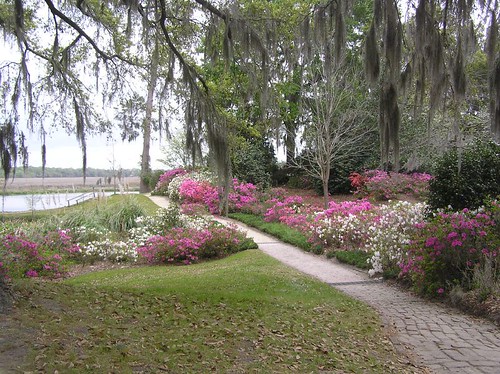 More on Flickr.
Thursday, March 29, 2007
SnTT - Outbound e-mail address formatting
Alan Lepofsky shared a tip recently that shows how users can control their own outbound e-mail address formatting. This works well if you work from a local mail replica, but if you're a typical office worker who accesses his mail directly from the server, you're sorta* out of luck. Notes 6 shipped with a feature called Dynamic Client Configuration that updates your Location document with information from the server and one of the fields that gets overwritten is the Internet Address. So if you apply Alan's tip and you regularly connect to a Domino server, your changes will be overwritten.
I'm a dual propeller beanie wielding developer and admin so I get the lovely joy of figuring out how to use layers and researching how to configure a mail server so it shows users' full names as well as e-mail addresses. Lucky for you I'm the generous sort who doesn't mind sharing. :-)
Before we dive into the technical bits it helps to understand the big picture of how this fits together. The Notes client can send e-mail through a Domino server or directly to the Internet. This is controlled via the Location document that is selected in Notes.
 If you send mail directly to the Internet, the e-mail address on the Location document is used. In this case using Alan's tip makes sense, since there is nothing else that is going to take care of adding extra bits to your outbound e-mail address. If you send through a Domino server the server's configuration is used, so it's best let the server to do the conversion.
Configuring how the Domino server formats outbound e-mail addresses is done in a Global Domain document.

If you don't already have a Global Domain document create one by clicking the Add Domain button. If you have multiple Global Domain documents, one needs to be designated as the default.

The important part here is the Conversion tab. Note the last field, which specifies the Address format. I had to set this to Name and Address even though the section above it very specifically states it is not used in R5 or higher.

It's as simple as that. Now all outbound e-mail that goes through the server will include the sender's name. Remember, if you're working from a local replica and sending mail directly to the Internet you will have to use Alan's tip to include your name with your address.
There is also a section on the default Configuration document that deals with some server level configuration of mail addressing. I honestly had no idea this existed until Thomas Adrian mentioned it as a response to Alan's blog post. According to a later response, this doesn't work reliably. I've been using a Global Domain document for years and never had any issues. Hopefully a better admin than I am can explain when the Configuration document is needed and when a Global Domain document is needed.
* I said sorta because there is a way to disable Dynamic Client Configuration (the feature that lets the the server update your Location document), but it's not one I show end users since it hobbles administrative abilities and I need all the help I can get. See the responses on Alan's blog if you're interested in how DCC can be turned off.
I'm a dual propeller beanie wielding developer and admin so I get the lovely joy of figuring out how to use layers and researching how to configure a mail server so it shows users' full names as well as e-mail addresses. Lucky for you I'm the generous sort who doesn't mind sharing. :-)
Before we dive into the technical bits it helps to understand the big picture of how this fits together. The Notes client can send e-mail through a Domino server or directly to the Internet. This is controlled via the Location document that is selected in Notes.
 If you send mail directly to the Internet, the e-mail address on the Location document is used. In this case using Alan's tip makes sense, since there is nothing else that is going to take care of adding extra bits to your outbound e-mail address. If you send through a Domino server the server's configuration is used, so it's best let the server to do the conversion.
Configuring how the Domino server formats outbound e-mail addresses is done in a Global Domain document.

If you don't already have a Global Domain document create one by clicking the Add Domain button. If you have multiple Global Domain documents, one needs to be designated as the default.

The important part here is the Conversion tab. Note the last field, which specifies the Address format. I had to set this to Name and Address even though the section above it very specifically states it is not used in R5 or higher.

It's as simple as that. Now all outbound e-mail that goes through the server will include the sender's name. Remember, if you're working from a local replica and sending mail directly to the Internet you will have to use Alan's tip to include your name with your address.
There is also a section on the default Configuration document that deals with some server level configuration of mail addressing. I honestly had no idea this existed until Thomas Adrian mentioned it as a response to Alan's blog post. According to a later response, this doesn't work reliably. I've been using a Global Domain document for years and never had any issues. Hopefully a better admin than I am can explain when the Configuration document is needed and when a Global Domain document is needed.
* I said sorta because there is a way to disable Dynamic Client Configuration (the feature that lets the the server update your Location document), but it's not one I show end users since it hobbles administrative abilities and I need all the help I can get. See the responses on Alan's blog if you're interested in how DCC can be turned off.
Wednesday, March 28, 2007
Dining With Friends
For the past 8 years my partner, Myron, and I have participated in a fund raiser for Low Country AIDS Services (LAS) called Dining With Friends. The idea is a group of people get together, have dinner, and bring donations for LAS. Pretty much anything goes for the dinner portion. Some people do a potluck, some do a progressive dinner, some rent venues and hire bands. We just have it at our house and we cook all the food ourselves, with the help of some extremely patient and hardworking friends. Our party begins at 6:00 PM and at 9:00 PM there is a reception at the Charleston Maritime Center with champagne fountains, more desserts than you can count, and a live band.
I relocated from Atlanta to Charleston in 1997 and we decided to throw a Dining With Friends party in 1998 so I could meet more of Myron's friends. The first year we had about 15 people show up. We prepared a bunch of random appetizers, drank too much wine, and it was a lot of fun. I don't think we even made it to the dessert reception. :-p By the third or fourth year our party had grown to about 40 people. The people we knew were inviting people they knew and it became a wonderful evening of camaraderie, food and people wanting to help a very worthy organization.
It just so happened that Dining With Friends fell on May 5th about the time our party was having exponential growth. To make it easier on ourselves we decided to do a Cinco de Mayo themed party. That was the first year we did a theme and we have kept it up ever since. So far we have prepared Mexican, Mediterranean, Moroccan, Spanish and Portuguese tapas, French bistro, and Caribbean cuisines. (The idea of Asian food keeps coming up, but it needs to be served fresh and hot, which is hard to do in this kind of setting. Not to mention the amount of work involved.)
We take a hands on approach to our party because we both get tremendous joy from cooking and sharing it with our friends... and their friends... and their friends... The goal, though, is to help LAS, which gets about 10% of its operating budget from Dining With Friends. Our first party raised a little over $200 in donations; at our most recent we collected $3700. We didn't think to keep track, but the best we can figure we have raised about $12,000 for LAS over the last 8 years. The money is only used for local programs and we feel good about giving back to the community.
If you're in Charleston on Saturday, May 5th give us a shout. We'll be having a party and everyone is invited. We'll provide the beer, wine, food and probably some kind of calamitous drama. :-)
I relocated from Atlanta to Charleston in 1997 and we decided to throw a Dining With Friends party in 1998 so I could meet more of Myron's friends. The first year we had about 15 people show up. We prepared a bunch of random appetizers, drank too much wine, and it was a lot of fun. I don't think we even made it to the dessert reception. :-p By the third or fourth year our party had grown to about 40 people. The people we knew were inviting people they knew and it became a wonderful evening of camaraderie, food and people wanting to help a very worthy organization.
It just so happened that Dining With Friends fell on May 5th about the time our party was having exponential growth. To make it easier on ourselves we decided to do a Cinco de Mayo themed party. That was the first year we did a theme and we have kept it up ever since. So far we have prepared Mexican, Mediterranean, Moroccan, Spanish and Portuguese tapas, French bistro, and Caribbean cuisines. (The idea of Asian food keeps coming up, but it needs to be served fresh and hot, which is hard to do in this kind of setting. Not to mention the amount of work involved.)
We take a hands on approach to our party because we both get tremendous joy from cooking and sharing it with our friends... and their friends... and their friends... The goal, though, is to help LAS, which gets about 10% of its operating budget from Dining With Friends. Our first party raised a little over $200 in donations; at our most recent we collected $3700. We didn't think to keep track, but the best we can figure we have raised about $12,000 for LAS over the last 8 years. The money is only used for local programs and we feel good about giving back to the community.
If you're in Charleston on Saturday, May 5th give us a shout. We'll be having a party and everyone is invited. We'll provide the beer, wine, food and probably some kind of calamitous drama. :-)
Monday, March 26, 2007
Thursday, March 22, 2007
SnTT - Layers for Dummies
When I saw the work Nathan was doing with layers last year (the graphics have been removed, but trust me when I say it was really really cool) I was excited and I rushed off to start using them... but I quickly got stuck. I didn't have a real business need at the time, so the work I was doing was purely proof of concept. It was cool, but I didn't have any reason to do it so I gave up and moved on.
Then along came Lotusphere and Nathan and Chris' now famous BP101 - Interface Matters presentation, and I was once again dazzled by what could be achieved with layers. Also at Lotusphere, Ben Langhinrichs discussed using layers in his portion of Speedgeeking. That was so overwhleming (both Ben's content and the session) that I didn't have time to process it. And finally, Ben published another article about using layers that had some truly amazing effects. So I knew layers were nifty, I just had to find a place to use them in the course of my work.
In a recent application users are entering customer information for a special order. In the following section only two fields are required and I'm using a field hint to indicate that. I started out with a fairly standard layout that you see all the time:

And of course users would end up filling it out like this:

I talked to the users about this and they said the fields were running together visually. Okay, using OS style fields and laying it out better would help, but mixing formats on the same form would be messy and I didn't want to convert everything to OS style right now. Also, users didn't really understand that they didn't have to fill out the address fields. As they tabbed through the form their cursor would land in those fields so they completed them. I could have altered the tab order, but the rest of the form has over 60 fields (not all visible at the same time so calm down, Nathan). And besides, now I finally had a reason to figure out layers. :)
Here's what I came up with. Now if the user needs to fill in the address, they click the Address hyperlink
 ... fill in the information ...
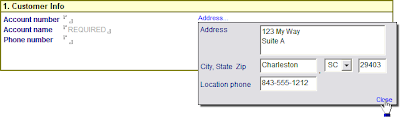 ... and click Close to see the information displayed on the main form. I decided not to use labels since it's obviously an address.

I know I need to do some more work to make this more appealing, but still this is a step forward. I have seen lots of demos of layers, but I haven't seen a step by step walkthrough of how to implement one from start to finish. Maybe that's because I'm more dense than most and everyone else has figured it out already, but in the off chance there are any other slow people out here I thought I would share a detailed tutorial.
Before I get into how this was built, there are some mechanics you need to know.
 What you see here is an outer 1 x 2 table with the yellow header. The second row of this table has a 2 x 1 table. The inner left column has a 2 x 3 table with the always visible fields, and the inner right column has a 2 x 1 table. The most important part is this inner right column. This contains the hyperlink to open the layer, the layer anchor, and the field that will hold the final results of the user's action.
I didn't have to use a table for the Address hyperlink and the layer anchor. At first I just had everything aligned vertically, but when the layer becomes visible, the anchor also becomes visible and you can see the screen jump. By putting the anchor beside the Address link, which is already visible, there is no jump. There are probably other ways around that issue, this is just how I chose to handle it. I'm also very picky about stuff like that.
Showing and hiding the layer is the most complicated part of this operation, but basically all you're doing is setting a flag that is used in a hide/when formula. Highlight the Address text and create an Action hotspot as follows:
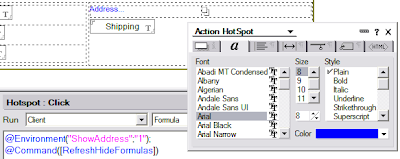 You'll notice I'm using the notes.ini to store the address layer's state. I'm doing this so I don't have to clutter the form with fields. Also, I can use this same variable for multiple applications if I start using an Address layer popup frequently. You could use a field on the form to store this if you choose. Let's set the hide/when on the anchor to make use of the environment variable:
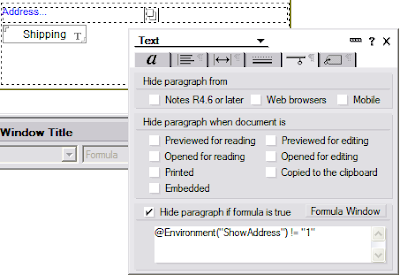
... and move on to positioning and sizing the layer.
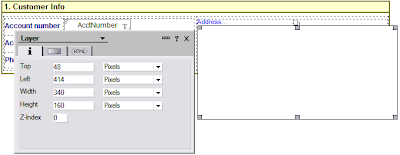 You can put fields directly on the layer, but you'll notice the formatting options for a layer are pretty limited. I chose to leave mine blank and use a table as my main container instead. I set it up with a border and a drop shadow, since it is displayed as a popup
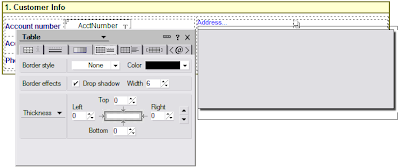
Now we can put the fields on the layer, and I used another table for the layout
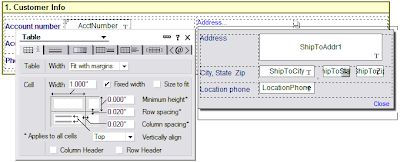 All the fields are set to OS style and I played around with the widths until I got them to line up nicely when they were displayed for the user. The final step is to code the Close link, which updates the Shipping field on the document and hides the layer
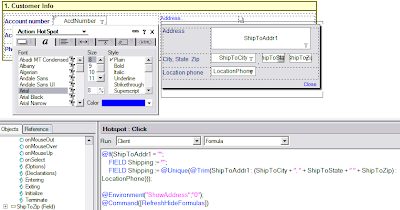
I'm using a field for the shipping information because I later use this information in a form letter. Rather than having to deal with all the discrete fields I aggregate them once to make it easier on myself later. Since I need to show it anyway, it's a win/win.
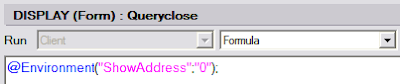
The final step is to make sure the layer is hidden if the user closes the form without clicking the Close button on the layer. I do this by setting the environment variable in the QueryClose event
And here's the final database: LayerDemo.nsf The UI is a little funky, it's got some concepts I'm playing around with. I figured while I was playing around with layers I might as well get a little crazy with some other ideas. :-)
[Many thanks to Nathan for pointing me in the direction of using the notes.ini variable. I also want to thank Nathan for making me aware of @Command([RefreshHideFormulas]). I hadn't come across that in 7 years of doing Notes development, but it sure would have made lots of things much easier if I had known about it sooner.]
Then along came Lotusphere and Nathan and Chris' now famous BP101 - Interface Matters presentation, and I was once again dazzled by what could be achieved with layers. Also at Lotusphere, Ben Langhinrichs discussed using layers in his portion of Speedgeeking. That was so overwhleming (both Ben's content and the session) that I didn't have time to process it. And finally, Ben published another article about using layers that had some truly amazing effects. So I knew layers were nifty, I just had to find a place to use them in the course of my work.
In a recent application users are entering customer information for a special order. In the following section only two fields are required and I'm using a field hint to indicate that. I started out with a fairly standard layout that you see all the time:

And of course users would end up filling it out like this:

I talked to the users about this and they said the fields were running together visually. Okay, using OS style fields and laying it out better would help, but mixing formats on the same form would be messy and I didn't want to convert everything to OS style right now. Also, users didn't really understand that they didn't have to fill out the address fields. As they tabbed through the form their cursor would land in those fields so they completed them. I could have altered the tab order, but the rest of the form has over 60 fields (not all visible at the same time so calm down, Nathan). And besides, now I finally had a reason to figure out layers. :)
Here's what I came up with. Now if the user needs to fill in the address, they click the Address hyperlink
 ... fill in the information ...
 ... and click Close to see the information displayed on the main form. I decided not to use labels since it's obviously an address.
I know I need to do some more work to make this more appealing, but still this is a step forward. I have seen lots of demos of layers, but I haven't seen a step by step walkthrough of how to implement one from start to finish. Maybe that's because I'm more dense than most and everyone else has figured it out already, but in the off chance there are any other slow people out here I thought I would share a detailed tutorial.
Before I get into how this was built, there are some mechanics you need to know.
- You hide a layer by applying a hide/when formula to its anchor. If you just hide everything on the layer you can't click anything underneath the layer, but you won't have any visual indicator of why. Conversely, hiding the anchor hides everything on the layer, so you don't have to put hide/whens on every element that is on the layer.
- Positioning a layer is more art than science. Designer adds some padding to things that can throw the position of the final display off a little, so expect to do some tweaking. I have had to close out of Designer and Notes and clear my Notes cache to get some odd display issues to clear up.
- You can show or hide a layer in Designer by right-clicking the layer or its anchor and using the context menu. Once you get a layer positioned exactly where you want the last thing you want to do is drag it out of the way.
 What you see here is an outer 1 x 2 table with the yellow header. The second row of this table has a 2 x 1 table. The inner left column has a 2 x 3 table with the always visible fields, and the inner right column has a 2 x 1 table. The most important part is this inner right column. This contains the hyperlink to open the layer, the layer anchor, and the field that will hold the final results of the user's action.
I didn't have to use a table for the Address hyperlink and the layer anchor. At first I just had everything aligned vertically, but when the layer becomes visible, the anchor also becomes visible and you can see the screen jump. By putting the anchor beside the Address link, which is already visible, there is no jump. There are probably other ways around that issue, this is just how I chose to handle it. I'm also very picky about stuff like that.
Showing and hiding the layer is the most complicated part of this operation, but basically all you're doing is setting a flag that is used in a hide/when formula. Highlight the Address text and create an Action hotspot as follows:
 You'll notice I'm using the notes.ini to store the address layer's state. I'm doing this so I don't have to clutter the form with fields. Also, I can use this same variable for multiple applications if I start using an Address layer popup frequently. You could use a field on the form to store this if you choose. Let's set the hide/when on the anchor to make use of the environment variable:
... and move on to positioning and sizing the layer.
 You can put fields directly on the layer, but you'll notice the formatting options for a layer are pretty limited. I chose to leave mine blank and use a table as my main container instead. I set it up with a border and a drop shadow, since it is displayed as a popup
Now we can put the fields on the layer, and I used another table for the layout
 All the fields are set to OS style and I played around with the widths until I got them to line up nicely when they were displayed for the user. The final step is to code the Close link, which updates the Shipping field on the document and hides the layer
I'm using a field for the shipping information because I later use this information in a form letter. Rather than having to deal with all the discrete fields I aggregate them once to make it easier on myself later. Since I need to show it anyway, it's a win/win.
The final step is to make sure the layer is hidden if the user closes the form without clicking the Close button on the layer. I do this by setting the environment variable in the QueryClose event

And here's the final database: LayerDemo.nsf The UI is a little funky, it's got some concepts I'm playing around with. I figured while I was playing around with layers I might as well get a little crazy with some other ideas. :-)
[Many thanks to Nathan for pointing me in the direction of using the notes.ini variable. I also want to thank Nathan for making me aware of @Command([RefreshHideFormulas]). I hadn't come across that in 7 years of doing Notes development, but it sure would have made lots of things much easier if I had known about it sooner.]
Sunday, March 18, 2007
taken out of context
It started innocently enough. The Notes 8 Beta was released to the public. Immediately people were up in arms and posting dozens of entries to the beta forum with the same topics. John Head took it upon himself to create some rules of engagement. That's when it got a little ugly.
Apparently Volker Weber was offended by John's self-empowered actions and launched a crusade against him. As is common, the statements Volker quoted were taken out of context and were not credited or referenced, making it somewhat difficult to determine who he was talking about. Today I was dragged into the tempest in a teacup when the same was done with some comments I made on Ed Brill's blog. Taken out of context and with no further discussion they seem to say one thing, when in reality the common interpretation is not the correct one.
I have already clarified my intent on both Ed and Nathan's blogs, but I'll repeat it here. First, the context. The conversation on Ed's blog was about things that hold up deployment of new software versions:
This is relevant to the discussion with Ed because the problems I have had with the beta will mean I will be doing more extensive and longer-term testing of Notes 8 than I have any previous version. That will significantly delay my Notes 8 deployment.
© 2007 Charles Robinson. All rights reserved.
Apparently Volker Weber was offended by John's self-empowered actions and launched a crusade against him. As is common, the statements Volker quoted were taken out of context and were not credited or referenced, making it somewhat difficult to determine who he was talking about. Today I was dragged into the tempest in a teacup when the same was done with some comments I made on Ed Brill's blog. Taken out of context and with no further discussion they seem to say one thing, when in reality the common interpretation is not the correct one.
I have already clarified my intent on both Ed and Nathan's blogs, but I'll repeat it here. First, the context. The conversation on Ed's blog was about things that hold up deployment of new software versions:
[Ed Brill] Raises an interesting question, Pete -- does the traditional software superstition that prevents organizations from deploying a "dot zero" release still apply? My impression is that a .0 could be dead solid perfect, but some companies by policy will still wait for a .0.1.
[Me] It's more testing and training that affect our rollout schedule than any perceived quality issue with .0 releases. As Dave said, by the time we have done our testing and gotten our training materials together the .01 release it out already.My take on John's rules is that they were basically asking everyone to do what they could to actually help the testing efforts. Complaining about things you couldn't change wouldn't help. In this case I'm having a problem getting the Notes 8 Basic or Standard clients to run. I don't have the time to do troubleshooting and crash analysis, so I opted not to report my problems. I have nothing substantive to report, therefore there is no reason for me to make a report. I could whine and wail in the beta forum but without any documentation it's rather pointless. John's rules of engagement influenced me, but I think in a positive way.
I will say that my testing of Notes 8 beta has gone very, very badly and that experience will greatly affect our adoption of Notes 8, regardless of the point release. I read John Head's rules and am taking them to heart, hence the silence regarding my issues. :)
This is relevant to the discussion with Ed because the problems I have had with the beta will mean I will be doing more extensive and longer-term testing of Notes 8 than I have any previous version. That will significantly delay my Notes 8 deployment.
© 2007 Charles Robinson. All rights reserved.
Wednesday, March 14, 2007
SnTT - Resetting the Prohibit Design Refresh flag on folders in mail databases
Okay, that last SNTT thing was a little weak so I decided to pull the trigger on one I've had saved for a while. :-)
This is a follow-up to a question someone asked during GURUpalooza at Lotusphere 2007. The scenario described is that after upgrading to a new version of Domino and applying a new mail database template, some users lost folders. This isn't an uncommon problem, and I posted a snippet of code in response to a similar question on the developerWorks Lotus forum. Gregg Eldred picked that up and blogged about it, but it is still coming up so I thought I would do a more formal write up, and clean up the code.
The reason the above happens is simple: if there is no template specified for the database and users create folders, the Prohibit design refresh from replacing or modifying option is not set. If there is a template defined, it is. What's odd is that when you create a mail database for someone the standard process sets the template name. Sometimes this gets wiped out, and I honestly don't understand why. I just know that in my own environment, with extremely technophobic users, it has happened a number of times.
What this means is that when the database is updated from its template, any folders a user created while the template was blank will be deleted. The documents are left in the database, though, and will show up in All Documents. You just have no way of knowing what folder they should be in and it's a royal mess.
Below is a snippet of code that will take care of this for you. Here's a brief rundown of what it is doing:
This LotusScript was converted to HTML using the ls2html routine,
provided by Julian Robichaux at nsftools.com.
This is a follow-up to a question someone asked during GURUpalooza at Lotusphere 2007. The scenario described is that after upgrading to a new version of Domino and applying a new mail database template, some users lost folders. This isn't an uncommon problem, and I posted a snippet of code in response to a similar question on the developerWorks Lotus forum. Gregg Eldred picked that up and blogged about it, but it is still coming up so I thought I would do a more formal write up, and clean up the code.
The reason the above happens is simple: if there is no template specified for the database and users create folders, the Prohibit design refresh from replacing or modifying option is not set. If there is a template defined, it is. What's odd is that when you create a mail database for someone the standard process sets the template name. Sometimes this gets wiped out, and I honestly don't understand why. I just know that in my own environment, with extremely technophobic users, it has happened a number of times.
What this means is that when the database is updated from its template, any folders a user created while the template was blank will be deleted. The documents are left in the database, though, and will show up in All Documents. You just have no way of knowing what folder they should be in and it's a royal mess.
Below is a snippet of code that will take care of this for you. Here's a brief rundown of what it is doing:
- Open the Domino Directory
- Loop through all the Person documents to get the mail files
- Compare all the folders in each person's mail database with the template you specify
- If the folder exists in the template, it clears the Prohibit design refresh flag. This allows a design refresh to update anything that is in the template. If the folder is not in the template but it is in the user's mail file, set the Prohibit design refresh flag, which will prevent the design refresh from deleting the user's folders.
Sub Initialize
  '*** January 21, 2005 - Charles Robinson
  '*** Set the Prohibit Design Refresh flag on all non-template views and folders
  '*** to prevent a design refresh from overwriting user-created folders
  '***
  On Error Goto ErrTrap
  Dim nLog As NotesLog
  Set nLog = New NotesLog("Set Prohibit Design Refresh for Mail")
  Call nLog.OpenAgentLog

  Dim nSession As NotesSession
  Dim nDBNAB As NotesDatabase
  Dim nDBMail As NotesDatabase
  Dim nDBNTF As NotesDatabase
  Dim nVW As NotesView
  Dim nDoc As NotesDocument
  Dim nDCPeople As NotesDocumentCollection

  Set nSession = New NotesSession
  Set nDBNTF = nSession.GetDatabase("server/org", "template.ntf", False)
  Set nDBNAB = nSession.GetDatabase("server/org", "names.nsf", False)

  Set nDCPeople = nDBNAB.Search({Form = "Person"}, Nothing, 0)
  Set nDoc = nDCPeople.GetFirstDocument
  Do Until nDoc Is Nothing
     Set nDBMail = nSession.GetDatabase("server/org", nDoc.MailFile(0), False)
     If Not nDBMail Is Nothing Then
     Forall vw In nDBMail.Views
     'See if the view in the mail file exists in the template
        Set nVW = nDBNTF.GetView(vw.Name)
        'If not set the prohibitdesignrefresh flag
        vw.IsProhibitDesignRefresh = (nVW Is Nothing)
     End Forall
     End If

GetNextDoc:
     Set nDoc = nDCPeople.GetNextDocument(nDoc)
  Loop

  Set nVW = Nothing
  Set nDBNAB = Nothing
  Set nDBNTF = Nothing
  Set nDBMail = Nothing
  Set nDCPeople = Nothing
  Set nSession = Nothing

  Exit Sub

ErrTrap:
  Call nLog.LogError(Err, "Unable to modify database " & nDoc.MailFile(0))
  'This is necessary to prevent logging an error for every folder and overflowing the agent log
  Resume GetNextDoc
End Sub
provided by Julian Robichaux at nsftools.com.
SNTT - Donate your unused CPU cycles
| User | Daily Average | 2/28/2007 | 3/14/2007 |
| Lotus.Geek | 716 | 969,750 | 979,780 |
| smitty1024 | 793 | 712,747 | 723,848 |
| AndyBroyles | 1,050 | 640,985 | 655,688 |
| cerobinson | 4,468 | 253,802 | 316,350 |
| gjwolfswinkel | 904 | 201,324 | 213,979 |
What's that, you ask? Why it's an analysis of the World Community Grid points contributed by the top 5 members of the Lotus Domino Bloggers group from February 28th through today. What could that possibly have to do with SNTT? Nothing, really. It's just a really cool way to donate unused CPU cycles to a good cause. What's your excuse?
Tuesday, March 13, 2007
cool is king
In a recent article on Computerworld, Mike Elgan discusses the decline and fall of the Palm empire. One snippet stood out in my mind:
I don't want to turn this into another Lotus marketing sucks meme, because this isn't about marketing. It's about doing something cool that inspires people. Love it or hate it, you can't deny that Microsoft has poured a lot of innovation into the user experience in Outlook. Finally Lotus caught the clue bus. They devoted a ton of resources to making Notes 8 actually look good and not be such an odd duck.
I sat in Andre Guirard and Marc Jourdain's presentation at Lotusphere where they highlighted what was new in Domino Designer. I was amazed at some of the new functionality, but the features they demonstrated were taken out of context to highlight individual changes and improvements. This was really cool, but it was only part of the story.
Later in the week I attended Mary Beth Raven's presentation on designing the user interface. That's when I got the rest of the story. Everything Andre showed was directly linked to the work Mary Beth's team had done. I asked Mary Beth how much latitude they had when doing their designs, and was surprised when she said they were pretty much given carte blanche to do what was necessary, and development had the herculean task of making it happen.
Until I saw Andre's presentation describing the enhancements to the development environment I was going on the premise that you'd have to use Java to get the functionality of the new mail template. Seeing it all put together in Mary Beth's presentation really drove home the scope of the work involved. Not only did they redesign the Notes user experience, development had to create the tools to build it.
The amount of work put forth by Andre Guirard and his team is staggering and as a result Notes 8 looks abso-freaking-lutely fantastic! There's still a lot of work to be done, a lot of warts that need to be polished, but I'm thrilled to be working with Notes right now. That's a far cry from where I was a few months ago.
P.S. If this sounds too fanboy for some, don't despair. I've got some branding irons in the fire. Be afraid, Ed. Be very afraid. ;-)
HP fails in the smart-phone market in part because of an institutionalized delusion, common at most big and old Silicon Valley companies, that enterprises buy smart phones based on security, back-end infrastructure support and integration with enterprise systems in general.I think this is succinctly describes what has happened with Lotus in the last decade or so. Lotus was acquired by IBM, who has made a business out of huge incomprehensible systems, so they applied their bloat theory to Notes. While they were working on robust backends Microsoft, Google, Zimbra and a whole host of other vendors have been killing Lotus where it matters most: mindshare.
Yes, those things are important. But in the smart-phone market, cool is king, even at the biggest companies. RIM does a great job supporting business goals. But RIM is No. 1 because people "love" their BlackBerries. Palm is No. 2 (but dropping fast) because people "love" (or used to love) their Treos.
I don't want to turn this into another Lotus marketing sucks meme, because this isn't about marketing. It's about doing something cool that inspires people. Love it or hate it, you can't deny that Microsoft has poured a lot of innovation into the user experience in Outlook. Finally Lotus caught the clue bus. They devoted a ton of resources to making Notes 8 actually look good and not be such an odd duck.
I sat in Andre Guirard and Marc Jourdain's presentation at Lotusphere where they highlighted what was new in Domino Designer. I was amazed at some of the new functionality, but the features they demonstrated were taken out of context to highlight individual changes and improvements. This was really cool, but it was only part of the story.
Later in the week I attended Mary Beth Raven's presentation on designing the user interface. That's when I got the rest of the story. Everything Andre showed was directly linked to the work Mary Beth's team had done. I asked Mary Beth how much latitude they had when doing their designs, and was surprised when she said they were pretty much given carte blanche to do what was necessary, and development had the herculean task of making it happen.
Until I saw Andre's presentation describing the enhancements to the development environment I was going on the premise that you'd have to use Java to get the functionality of the new mail template. Seeing it all put together in Mary Beth's presentation really drove home the scope of the work involved. Not only did they redesign the Notes user experience, development had to create the tools to build it.
The amount of work put forth by Andre Guirard and his team is staggering and as a result Notes 8 looks abso-freaking-lutely fantastic! There's still a lot of work to be done, a lot of warts that need to be polished, but I'm thrilled to be working with Notes right now. That's a far cry from where I was a few months ago.
P.S. If this sounds too fanboy for some, don't despair. I've got some branding irons in the fire. Be afraid, Ed. Be very afraid. ;-)
just when you thought DST was done
Microsoft published a report that some Windows 2000, XP and 2003 computers are not properly using updated timezone information even if all patches and Registry hacks were properly applied. From the article:
You may see systems that have successfully applied the Windows DST2007 hotfix 931836 but are still operating on old DST rules after March 11. Opening the Time/Date control panel applet and changing the time zone to a new time zone; hitting apply, and changing it back to the original time zone will often correct this problem.
Another variation of this problem has been observed on Windows 2000. In that scenario after applying the DST hotfix or using TZEdit and then changing the time zone (manually or with the script above), the time zone still does not update. For that situation we’ve found that making the registry updates described in 914387 followed by running the script above will reliably cause the system to follow the new DST2007 rules. A symptom you may observe is that if you set the clock to the correct time, it will revert back to the incorrect time within one hour.
Monday, March 12, 2007
Creating Composite Applications tutorial
I stumbled across this in the Notes 8 Beta forum: Building Composite Applications for IBM Notes 8. It looks promising.
Notes 8 beta 2 system requirements comparison
| | Notes 7 | Notes 8 beta 2 - Classic | Notes 8 beta 2 - Standard |
| RAM | 128MB minimum | 128MB minimum | 512MB minimum |
| CPU | Intel Pentium | Intel Pentium | Intel Pentium |
| Hard disk | 512MB recommended | 512MB recommended | 900MB recommended |
Classic is the C++ client. Standard is the Expeditor (Eclipse RCP derived) version.
Friday, March 09, 2007
blog move going slower than anticipated
Life has been happening and I haven't managed to get my blog moved over to the Blogsphere template. I'm still planning to do that, though. I struggled with the IBM Blog Template for about three days before downloading Blogsphere, and I much prefer the latter. It has a setup wizard to create the base configuration, it has multiple easily selectable themes built in, and *gasp* there's even help!
Saturday, March 03, 2007
DST - don't forget about your Enterprise Integration components!
Today was my turn to venture into the DST rabbit hole. One thing NOT included in IBM's deployment guide: Enterprise Integration components. Absolutely, positively no mention anywhere of that. A friend on IRC stumbled across this fix for Notes 7, but it says nothing about Notes 6 or 6.5 clients.
I called Lotus support and was told the EI queue is callback only, and they only repond to critical calls on weekends. DST updates are not considered critical (yet?). It's also a little strange that numerous other hotfixes are posted with the technotes, but for the EI components you have to call support and ask for them if you're using Domino versions prior to 6.5.5 or 7.0.1.
**UPDATE**
I posed the question about EI updates for Notes 6/6.5 on the developerWorks Lotus forum, and Jean-Yves Riverin responded with the following collection of documents:
Now to figure out how to differentiate between R6 and R7 clients in a logon script.... I'll post that when I figure it out.
I called Lotus support and was told the EI queue is callback only, and they only repond to critical calls on weekends. DST updates are not considered critical (yet?). It's also a little strange that numerous other hotfixes are posted with the technotes, but for the EI components you have to call support and ask for them if you're using Domino versions prior to 6.5.5 or 7.0.1.
**UPDATE**
I posed the question about EI updates for Notes 6/6.5 on the developerWorks Lotus forum, and Jean-Yves Riverin responded with the following collection of documents:
DST 2007 fix for Lotus Enterprise Integrator 6.x
Contains instructions for obtaining a fix to address Daylight Saving Time 2007 changes in Lotus Enterprise Integrator (LEI) 6.x.
DST 2007 fix for Lotus Enterprise Integrator 7.x
Contains instructions for obtaining a fix to address Daylight Saving Time 2007 changes in Lotus Enterprise Integrator (LEI) 7.x.
DST 2007 fix for Domino Enterprise Connection Services 6.x
Contains instructions for obtaining a fix to address Daylight Saving Time 2007 changes in DECS 6.x.
DST 2007 fix for Domino Enterprise Connection Services 7.x
Contains instructions for obtaining a fix to address Daylight Saving Time 2007 changes in DECS 7.x.
Notes 6.x client DST 2007 fix for LSX for Lotus Connectors (LSXLC)
Contains instructions for obtaining a fix to address Daylight Saving Time 2007 changes in the Notes 6.x client for LSX for Lotus Connectors (LSXLC).
Notes 7.x client DST 2007 fix for LSX for Lotus Connectors (LSXLC)
Contains instructions for obtaining a fix to address Daylight Saving Time 2007 changes in the Notes 7.x client for LSX for Lotus Connectors (LSXLC).
Now to figure out how to differentiate between R6 and R7 clients in a logon script.... I'll post that when I figure it out.
Subscribe to:
Posts (Atom)