Spam is a never ending battle. A few years ago I purchased a
Barracuda Networks Spam Firewall 300 to help reduce my headaches and the load on my Domino servers. It is hands down the best $1900 I have spent and I have been nothing but thrilled with it. On the average day we reject over 85% of all inbound SMTP traffic with virtually no false positives.
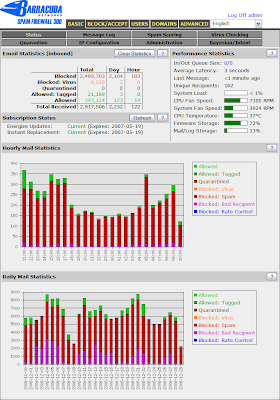
As you can see, the number of "bad recipients" is significant. Here's what happens during the delivery process:
- Barracuda checks its own rules and filters to see if the message is spam
- If it's not spam, it tries to deliver to Domino and waits for an OK response.
- Domino checks the recipient to make sure it's valid (I have this setting enabled). If it is, the Barracuda takes the response and updates the log to show the message was delivered.
- If the recipient isn't valid, the Barracuda shows the document as not delivered and flags it as a bad recipient. Meanwhile, Domino generates its own delivery failure report, which it delivers to the sender. The Barracuda doesn't cache these bad recipients, it just passes them through.
On an average day this isn't a problem. However in mid-December we started getting about 500 e-mails an hour for randomly generated e-mail addresses. Domino handled the load fine, but it was generating about 400MB of log entries a day and causing our mail.boxes to backlog with delivery failure reports.
I had to stop this. Luckily the Barracuda has the option to do LDAP lookups to verify recipients exist before it even tries to deliver the messages. Getting the Barracuda to resolve all the possible incoming e-mail addresses my users have proved to be more challenging than I expected.
Step One: Enabling LDAP in DominoLet me start by saying I am a mediocre Domino administrator. I find Domino Administrator overwhelming and difficult to use, and I honestly don't understand what a lot of it means. I usually leave it alone until something breaks, then I hit the Internet and methodically try solutions until something fixes my problem. Also, my knowledge of LDAP begins and ends with defining the acronym. I have a vague idea of what it does and why it's important, but it's never been anything I thought I would have a use for. Even with that crippling deficiency, enabling LDAP really isn't so bad.
The biggest trouble I had was finding the right Configuration document. The Domino Administrator help says to go to your default configuration document, but doesn't tell you which one that is. Since I only have LDAP running on my mail server I thought that's where I would go to enable it. Wrong-o. Here's the first thing that went wonky on me. When I open the Configurations view, this is what I get.
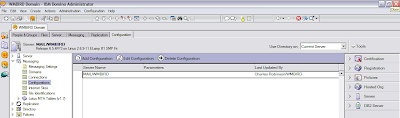
Notice the scrollbar on the right side of the view. If I scroll
up ....
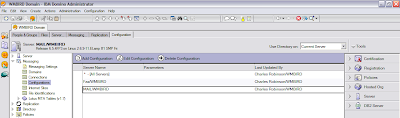
*Poof* I have more Configuration documents! Okay, maybe it's not magic (I can suspend my disbelief for a moment) and maybe some of you already knew about this. I don't understand why it's behaving like this, and I only discovered this when I accidentally hit the scroll wheel on my mouse and the other documents appeared, so color me clueless. The "default" Configuration document is the one listed as "* - [All Servers]". Once you find the Configuration document, click the Edit button and go to the LDAP tab.
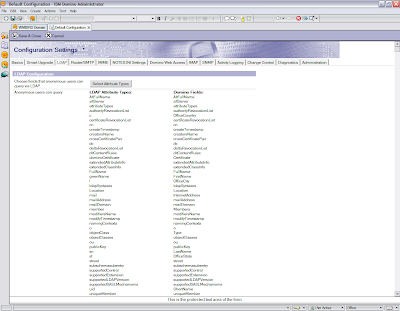
What this does is maps fields on the Person document to the standard
LDAP schema. I honestly have no clue what 99% of this stuff means or why it's relevant. I also don't know when/where/how/why all that stuff got put in there, but I just left it. I do know from extensive trial and error that at a minimum you need the cn, FullName, mail and shortname LDAP attributes. The only one I had to add was the FullName. The rest of the LDAP configuration is as follows.
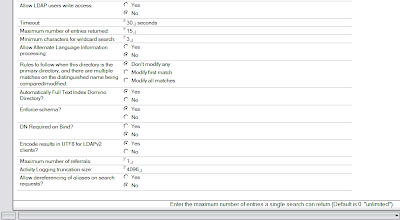
We already had anonymous LDAP enabled for some network scanners to be able to e-mail files to users. While setting that up I learned that if you don't limit the number of LDAP entries that can be returned it takes a while for LDAP to run through the entire directory. I only have 200 users and I was getting timeout errors. I set the maximum entries to 15 and the errors went away. I didn't do any analysis, I just tried it and it worked. Your mileage may vary. Once you have these settings to your liking, click Save and Close.
If you didn't have LDAP already loaded, load it from the server console (load ldap). If it was already running, issue the command
tell ldap reloadschema.
Step Two: Configuring the BarracudaLDAP configuration is done from the Domains tab.
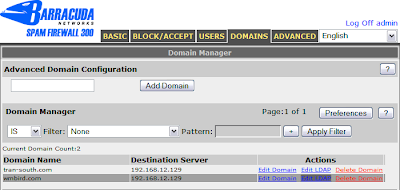
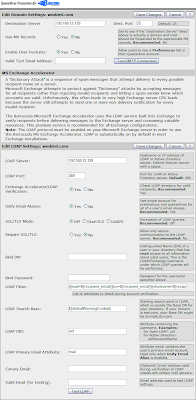
The important bits:
- LDAP Server - your server's IP address
- LDAP Port - 389 is the default
- Exchange Accelerator/LDAP Verification - Set to Yes
- Unify Email Aliases - Set to Yes, unless you have a reason not to. Everything I read on the Barracuda support forums said this should always be Yes, so I enabled it. Pittsburgh is still intact and mail is flowing, so I guess it didn't hurt anything.
- Bind DN - Only required if you don't allow anonymous LDAP. If that's the case I'll assume you know what to put here.
- Bind Password - Password for the above account.
- LDAP Filter - This is the most important part and requires more discussion. See below.
- Everything else - leave it at the default
The LDAP filter tells your Barracuda what LDAP fields to search and what constitutes a match. For example, if you used nothing but (|(mail=${recipient_email})), it would only look for an exact match on the incoming e-mail address. That is to say, if the InternetAddress field on the Person document does not contain the recipient e-mail address, this would not be a match and would be a "bad recipient".
And that's a bad, bad thing because... we have lots of people with e-mail aliases in the FullName field (which is labeled
User name on the Person record). Mostly this is when someone gets married, wants their primary e-mail address to be their married name, but still needs to get e-mail with their previous address. The easy way to accommodate this is to change the primary internet address and copy the old one to the FullName field as an alias.
A "mail=" search won't match these aliases. Okay, so you might think you could match the incoming name against the ShortName field since you rename people using the standard AdminP process. Unfortunately the automatic rename process does
not update the ShortName field. It could be part of your process to update it manually, but I haven't been doing that and didn't want to try to figure out which ones needed updating.
As you consider all the implications you might think you need to do a search against the FullName attribute. However, aliases entered in the FullName field are listed under the cn attribute. I don't understand why, but that's the way it works.
Taking all this into consideration, the LDAP filter on my production Barracuda is:
(|(mail=${recipient_email})(cn=${recipient_email})(shortname=${recipient_local_part}))
This searches for the internet address, any e-mail aliases, and the shortname as a final last-ditch attempt to get the message delivered. LDAP queries are always OR'ed, so if anything matches it will return a True, the message will be delivered, and life is good. But if
none of those match, the Barracuda will take care of sending the delivery failure report. The Barracuda does not cache invalid LDAP recipients, but at least Domino isn't having to do the double duty of doing both the lookup and generating a NDR.
That's all there is to it. As simple as the filter is, it took me many hours of tinkering before I finally found the right combination that worked for me. I strongly recommend you do some tests using the Test LDAP feature in the Barracuda to make sure you are getting everything you expect.
SnTT ,
show-n-tell thursday


