When I migrated my Domino Directory administration server from iSeries to Red Hat users started reporting seemingly random problems with room and resource reservations. Some reservations worked while others didn't. It wasn't a big deal, but it was one of those annoying things people would mention every week or so.
I finally dug into it and what I found was very interesting. In the logs for my server I kept seeing errors about a file RSVP.nsf not being found. I checked and careful scrutinity showed my reservations database is called rsvp.nsf. When I looked at the room and resource documents in the Mail-In Databases section of Domino Administrator some were listed with the database filename RSVP.nsf. I don't know how this happened, there isn't anywhere to enter the filename when you create a new resource. Apparently Linux is case-sensitive with regards to reservations while the iSeries is not. I changed everything to point to rsvp.nsf and it all works now.
One more "gotcha" to add to the list: check all filename references for proper casing after migrating to Linux.
Friday, September 29, 2006


Thursday, September 28, 2006
Sametime 7.5 Limited Use?
Sametime 7.5 was released on Wednesday, September 13th. It's now Thursday, September 28th. Fifteen days later there is still no Sametime 7.5 Limited Use. The 7.0 Limited Use version was posted at the same time as the full version so I'm not sure what's going on. Does anyone know?
Monday, September 25, 2006
Am I too lost to be saved?
I have been participating in another thread over on Ed Brill's blog and I started out writing a rebuttal of Alan's list (comment 44) of new features that have been released for Domino Designer. As I formulated my response I had an epiphany. I appreciate the elegance of the framework delivered in Notes and Domino. I appreciate Domino's server architecture, even if I'm a bit mystified and sometimes frustrated by it.
I hate Domino Designer with a passion. I loathe coming to work because I know I'll have to use Designer. I truly feel it is the worst piece of software I have ever used in my 15 year development career. I was ready to quit my job after Lotusphere but an e-mail exchange with some IBM'ers convinced me to hold out some hope that Hannover would make the development process significantly better. I now realize there is no hope of it getting better until a post-Hannover release. What I have today is what I will have for at least another year.
I know a few months ago I said I enjoy working with Notes and Domino, and that is still true. However, for me the face of that is Domino Designer, and staring into that hideous visage every day is becoming increasingly difficult. I'm not sure where this leaves me, besides really frustrated and jaded. I think I'm just burned out.
The reality is I have bills to pay and my skillset is 100% Notes and Domino, so the likelihood of me making any significant changes anytime soon is slim. I'll continue working with Notes and Domino while I formulate an exit strategy, and will continue participating in the online community. Who knows, maybe I'll start liking Notes development again. Right now my enthusiasm is at an all-time low.
I hate Domino Designer with a passion. I loathe coming to work because I know I'll have to use Designer. I truly feel it is the worst piece of software I have ever used in my 15 year development career. I was ready to quit my job after Lotusphere but an e-mail exchange with some IBM'ers convinced me to hold out some hope that Hannover would make the development process significantly better. I now realize there is no hope of it getting better until a post-Hannover release. What I have today is what I will have for at least another year.
I know a few months ago I said I enjoy working with Notes and Domino, and that is still true. However, for me the face of that is Domino Designer, and staring into that hideous visage every day is becoming increasingly difficult. I'm not sure where this leaves me, besides really frustrated and jaded. I think I'm just burned out.
The reality is I have bills to pay and my skillset is 100% Notes and Domino, so the likelihood of me making any significant changes anytime soon is slim. I'll continue working with Notes and Domino while I formulate an exit strategy, and will continue participating in the online community. Who knows, maybe I'll start liking Notes development again. Right now my enthusiasm is at an all-time low.
Thursday, September 21, 2006
SNTT - Doing a multi-user install of Lotus Notes 7.01 on Windows Terminal Services 2003 - Part 1
Throughout Notes' long history there has been pretty much one way to do multi-user installs: create separate Location documents for each user that points to their own bookmarks.nsf and ID files and the users change locations to log in as the different users.
That worked fine when it was essentially a shared terminal, with people working different shifts. Then along came Windows Terminal Services (WTS). Since you have numerous people all logged in at once this approach doesn't work. To address this scenario, IBM published a RedBook describing a new process. In a nutshell, you install Notes to the server and put the data directory on the user's home directory, which is typically mapped as H:. Next you create a shortcut to nlnotes.exe and set it to start in the user's home directory, such as H:\Lotus\Notes\Data. This works, but every time you upgrade you have to be careful to copy over all the new files, replacing the old ones, and bookmark.nsf in particular could be a pain to handle.
In my organization we used the old method on our WTS servers when we were on R5, and then migrated our 80 users to R6 and did another upgrade to 6.5. Each time we did the upgrade manually and three people spent most of a weekend at work copying files and validating the install for every user. It was pretty painful and not something we wanted to repeat. There are ways to create scripts to make it easier, but it's still a time-consuming and error-prone process.
Enter multi-user setup. With a multi-user installation the program and template files are stored in a location accessible to all users. But each user's personal files, such as names.nsf, bookmarks.nsf and their ID, are stored in C:\Documents and Settings\[username]\Application Data\Local Settings\Lotus\Notes\Data. Each user runs the Notes setup and it creates the files they need. When you do an upgrade, you just run setup the same as you would for a single-user install and you're done.
Getting a multi-user install to work on WTS the first time does take some effort. It also requires some manual tweaking, which I discovered after I ran the install, double-clicked the icon and nothing happened. Well the splash screen popped up, then went away, so I guess something happened. I went digging on Notes.Net and found this post by Christopher E. Stevens, which describes how to make it work. The instructions provided were for Notes 6.0 and Windows 2000, but I'm working with Windows Server 2003 and the steps are slightly different so I'll document them here.
The following instructions assume you used all the default paths for installing Windows and Notes. If you changed any of those, adjust them accordingly below.
Install Notes.
I would like to thank Christopher E. Stevens for the Notes.Net posting I reference above. Without that I would still be scratching my head.
SnTT , show-n-tell thursday
That worked fine when it was essentially a shared terminal, with people working different shifts. Then along came Windows Terminal Services (WTS). Since you have numerous people all logged in at once this approach doesn't work. To address this scenario, IBM published a RedBook describing a new process. In a nutshell, you install Notes to the server and put the data directory on the user's home directory, which is typically mapped as H:. Next you create a shortcut to nlnotes.exe and set it to start in the user's home directory, such as H:\Lotus\Notes\Data. This works, but every time you upgrade you have to be careful to copy over all the new files, replacing the old ones, and bookmark.nsf in particular could be a pain to handle.
In my organization we used the old method on our WTS servers when we were on R5, and then migrated our 80 users to R6 and did another upgrade to 6.5. Each time we did the upgrade manually and three people spent most of a weekend at work copying files and validating the install for every user. It was pretty painful and not something we wanted to repeat. There are ways to create scripts to make it easier, but it's still a time-consuming and error-prone process.
Enter multi-user setup. With a multi-user installation the program and template files are stored in a location accessible to all users. But each user's personal files, such as names.nsf, bookmarks.nsf and their ID, are stored in C:\Documents and Settings\
Getting a multi-user install to work on WTS the first time does take some effort. It also requires some manual tweaking, which I discovered after I ran the install, double-clicked the icon and nothing happened. Well the splash screen popped up, then went away, so I guess something happened. I went digging on Notes.Net and found this post by Christopher E. Stevens, which describes how to make it work. The instructions provided were for Notes 6.0 and Windows 2000, but I'm working with Windows Server 2003 and the steps are slightly different so I'll document them here.
The following instructions assume you used all the default paths for installing Windows and Notes. If you changed any of those, adjust them accordingly below.
Install Notes.
- Insert the Notes client CD and select the option to Install Notes 7.01. It must be the regular Notes client CD, the CD that has Designer and Administrator on it will not work. I don't know if the download from Passport Advantage will work or not, I ordered the CD to get the InstallShield Tuner so I just used it.
- The regular WTS software installation dialog will pop up in the background, ignore it for now.
- Treat this as a regular install until you get to the prompt asking whether this is for the current user or all users. Select all users, then continue through a regular install.
- When finished close the WTS software installation dialogs.
- Do not launch Notes yet!
- Open C:\Windows\notes.ini in Notepad.
- Select everything in the file and delete it.
- Paste in the following:
[Notes]
KitType=1
SharedDataDirectory=C:\Documents and Settings\All Users\Application Data\Lotus\Notes\Data\Shared
InstallType=6 - Save and close the file.
- Move (not copy) the file you just edited to C:\Documents and Settings\All Users\Application Data\Lotus\Notes\Data. It is critical that there not be a copy of notes.ini in your C:\Windows directory so be sure to double-check that it's gone before proceeding.
- Open the Registry editor and navigate to HKLM\Software\Lotus\Notes.
- Double-click the DataPath key and delete its value.
- Double-click the Multiuser key and change its value from 0 to 1
- Navigate down to HKLM\Software\Lotus\Notes\7.0
- Repeat steps 2 and 3. Take care not to delete the actual DataPath keys, just their values. Also note these are under the HKEY_LOCAL_MACHINE hive. You will find similar keys in HKCU, so be sure you are changing the appropriate ones.
I would like to thank Christopher E. Stevens for the Notes.Net posting I reference above. Without that I would still be scratching my head.
SnTT , show-n-tell thursday
Wednesday, September 20, 2006
done with the bickering
Debate is a healthy part of any relationship. I have participated in a number of debates brewing in the Domino blogosphere:
However, some people use the platform of debate as a platform for attacking. Even more ridiculously, many of these same people formed the basis of their attack from second-hand information rather than personal experience. A common tactic of this group is to use convenient half-truths and hypocrisy to land their blows. In surveying the Microsoft blogosphere I can't find anyone who routinely attacks IBM, Lotus, Notes or Domino. By contrast I read a number of Notes and Domino blogs that have at least one article a month bashing Microsoft or Exchange.
For example, a Google search on Ed Brill's blog shows 3660 posts containing "Lotus OR Domino". The same search of his site for "Microsoft OR Exchange" returns 3640 results. Granted this does include both main topics as well as responses, but it is still pretty incredible that it is as close as it is. I read blogs of IBM'ers to get more information on what Domino can do for me but this shows I'm hearing about Microsoft and Exchange as often as I am Lotus or Domino.
Ed isn't alone in his bashing of Microsoft and I don't mean to single him out, he's just the most visible. I could name half a dozen more bloggers of note in the Domino arena who routinely attack Microsoft. Interestingly enough, I can't find anyone associated with Microsoft who ever does the same with regards to Notes or Domino.
Peter de Haas does write about IBM fairly frequently, but his postings are more about integration pieces between Microsoft products and Notes and Domino, with very few focused on competitive situations and he rarely says anything negative about Domino. Alan Lepofsky is one of the few Domino bloggers who takes a similar approach. Even when he does tread into the area of criticizing Microsoft, Alan's approach is fair, insightful and based on hands-on experience.
I think I'm writing all this because I'm disappointed. I have been hoping that the Domino blogosphere would at least reduce the attacks to focus on Hannover and Domino Next. With Exchange 2007 and Vista coming closer to release, though, it seems that the Domino community would rather pull Microsoft down than focus on keeping IBM on track. We've been letting IBM slide with little in the way of substantive updates for a very long time. If you aren't outraged you haven't been paying attention.
Does anyone want to take the high road with me?
- Websphere vs. Domino
- Workplace vs. Notes
- Java vs. LotusScript
However, some people use the platform of debate as a platform for attacking. Even more ridiculously, many of these same people formed the basis of their attack from second-hand information rather than personal experience. A common tactic of this group is to use convenient half-truths and hypocrisy to land their blows. In surveying the Microsoft blogosphere I can't find anyone who routinely attacks IBM, Lotus, Notes or Domino. By contrast I read a number of Notes and Domino blogs that have at least one article a month bashing Microsoft or Exchange.
For example, a Google search on Ed Brill's blog shows 3660 posts containing "Lotus OR Domino". The same search of his site for "Microsoft OR Exchange" returns 3640 results. Granted this does include both main topics as well as responses, but it is still pretty incredible that it is as close as it is. I read blogs of IBM'ers to get more information on what Domino can do for me but this shows I'm hearing about Microsoft and Exchange as often as I am Lotus or Domino.
Ed isn't alone in his bashing of Microsoft and I don't mean to single him out, he's just the most visible. I could name half a dozen more bloggers of note in the Domino arena who routinely attack Microsoft. Interestingly enough, I can't find anyone associated with Microsoft who ever does the same with regards to Notes or Domino.
Peter de Haas does write about IBM fairly frequently, but his postings are more about integration pieces between Microsoft products and Notes and Domino, with very few focused on competitive situations and he rarely says anything negative about Domino. Alan Lepofsky is one of the few Domino bloggers who takes a similar approach. Even when he does tread into the area of criticizing Microsoft, Alan's approach is fair, insightful and based on hands-on experience.
I think I'm writing all this because I'm disappointed. I have been hoping that the Domino blogosphere would at least reduce the attacks to focus on Hannover and Domino Next. With Exchange 2007 and Vista coming closer to release, though, it seems that the Domino community would rather pull Microsoft down than focus on keeping IBM on track. We've been letting IBM slide with little in the way of substantive updates for a very long time. If you aren't outraged you haven't been paying attention.
Does anyone want to take the high road with me?
Monday, September 18, 2006
Migrating Windows XP 64 to a new drive
Due to budget constraints when I built my new computer I used the old 60GB EIDE drive I had. Recently I upgraded to a new 320GB Seagate ST3320620AS SATA2 drive. This is pretty state of the art and uses perpendicular storage technology. Previously whenever I have done anything like this I just reinstalled OS and all the software, then migrated over all the data. The last time it took me a few days to get everything working properly but I decided that since this was a newly built PC I could save myself some time and frustration by just moving everything from the old drive to the new one. I've never done this on a home computer before, or on a 64-bit OS, and it proved to be more difficult than I would have thought.
I use Ghost all the time at work, so I brought home some Ghost floppy disks. Then I realized I don't have a floppy drive in my case. No problem, I thought, I'll just open the case and connect a floppy drive to the motherboard. After rounding up the drive and cable and cracking open the case I realized my power supply doesn't even have a floppy drive power connector! Okay, so I'll go old school and boot from a CD, do a diskcopy, then update the partition tables. I couldn't get Nero 7 Ultra Edition to include extra files on a bootable CD, so no joy there. Many CD coasters, numerous software downloads and lots of Google searching later I stumbled across Acronis True Image Home.
I installed the 15 day trial version of True Image Home and ran the drive migration wizard. It was simply a matter of selecting my old drive, selecting the new one, and clicking OK. It automatically adjusted the boot partition on the new drive to take up the entire newer drive but you can do manual adjustments if you choose. You can also choose what you want it to do with the old drive. You can leave it alone, which is what I did, or have it repartition it for you.
After going through the wizard the computer rebooted, displayed the Windows XP boot screen, then started the migration in a strange CLI-looking window. I wandered off and about half an hour later when I came back the computer was shut down. I tried turning it on and it would just shut back off. Before I started I wondered what would happen since my EIDE drive still thought it was the boot drive and now the new SATA drive also had the same idea. With the computer off I opened the case, disconnected the old EIDE drive, started the computer and it booted from the SATA drive!
I'm one of those bad, bad people who don't do backups of my home computer so I don't have a need for Acronis True Image Home. If I did do backups, though, this is the product I would use. I do highly recommend it for doing migrations. It was incredibly simple considering everything else I tried. It all runs directly from the hard drive so you don't have to worry about making floppies or burning CD's, and other than the boot drive confusion it was pretty much idiot proof.
I also highly recommend the Seagate ST3320620AS drive. Be aware that it comes set up for SATA1 by default and you have to remove a tiny and difficult to reach jumper to enable SATA2. This is shown on a sticker on the top of the drive, but looking at the label is akin to reading instructions and who does that? The drive is amazingly fast and is the quietest drive I've ever worked with. Even running a defrag it's barely audible. I chose the Antec Aria case because is is extremely quiet and now that my hard drive is nearly silent I'm a very happy camper.
[Note that Acronis also offers Migrate Easy. Be aware that it does not support XP64. If you install Migrate Easy on a 32-bit OS it you can create a bootable CD, but you cannot do a disk to disk migration using the trial version's bootable CD. The full version does support that, and will allow you to migrate XP 64. Since I didn't have a 32-bit OS to install on I used the trial version of True Image Home instead.]
I use Ghost all the time at work, so I brought home some Ghost floppy disks. Then I realized I don't have a floppy drive in my case. No problem, I thought, I'll just open the case and connect a floppy drive to the motherboard. After rounding up the drive and cable and cracking open the case I realized my power supply doesn't even have a floppy drive power connector! Okay, so I'll go old school and boot from a CD, do a diskcopy, then update the partition tables. I couldn't get Nero 7 Ultra Edition to include extra files on a bootable CD, so no joy there. Many CD coasters, numerous software downloads and lots of Google searching later I stumbled across Acronis True Image Home.
I installed the 15 day trial version of True Image Home and ran the drive migration wizard. It was simply a matter of selecting my old drive, selecting the new one, and clicking OK. It automatically adjusted the boot partition on the new drive to take up the entire newer drive but you can do manual adjustments if you choose. You can also choose what you want it to do with the old drive. You can leave it alone, which is what I did, or have it repartition it for you.
After going through the wizard the computer rebooted, displayed the Windows XP boot screen, then started the migration in a strange CLI-looking window. I wandered off and about half an hour later when I came back the computer was shut down. I tried turning it on and it would just shut back off. Before I started I wondered what would happen since my EIDE drive still thought it was the boot drive and now the new SATA drive also had the same idea. With the computer off I opened the case, disconnected the old EIDE drive, started the computer and it booted from the SATA drive!
I'm one of those bad, bad people who don't do backups of my home computer so I don't have a need for Acronis True Image Home. If I did do backups, though, this is the product I would use. I do highly recommend it for doing migrations. It was incredibly simple considering everything else I tried. It all runs directly from the hard drive so you don't have to worry about making floppies or burning CD's, and other than the boot drive confusion it was pretty much idiot proof.
I also highly recommend the Seagate ST3320620AS drive. Be aware that it comes set up for SATA1 by default and you have to remove a tiny and difficult to reach jumper to enable SATA2. This is shown on a sticker on the top of the drive, but looking at the label is akin to reading instructions and who does that? The drive is amazingly fast and is the quietest drive I've ever worked with. Even running a defrag it's barely audible. I chose the Antec Aria case because is is extremely quiet and now that my hard drive is nearly silent I'm a very happy camper.
[Note that Acronis also offers Migrate Easy. Be aware that it does not support XP64. If you install Migrate Easy on a 32-bit OS it you can create a bootable CD, but you cannot do a disk to disk migration using the trial version's bootable CD. The full version does support that, and will allow you to migrate XP 64. Since I didn't have a 32-bit OS to install on I used the trial version of True Image Home instead.]
Friday, September 15, 2006
For all the code monkeys out there
I'm a proud code monkey, and my friend Adam recently turned me on to an awesome song called Code Monkey by Jonathan Coulton. It's released under the Creative Commons license but if you like it please toss the guy $1 through his donation link.
Thursday, September 14, 2006
Technorati frustrations
Ed Brill posted recently about his blog taking a while to update in Technorati. I just checked, and the last Show-n-Tell Thursday entry Technorati shows for me was on Thursday, August 23rd. I posted a new SNTT entry this past Tuesday, September 12th, and pinged Technorati of the update. It's still not shown, but other postings from as recently as an hour ago are. I will continue to use Technorati tags but this doesn't lessen my frustrations over their seemingly haphazard method of polling for updates.
Tuesday, September 12, 2006
SNTT - Letting a user reorder documents from a listbox
I've been working on a project tracker to help me get organized. It's got a lot of nifty bells and whistles, but one thing that was critical was giving my boss the ability to easily reprioritize projects. Getting this implemented proved to be a bit of a challenge so I thought I would share the technique.
The idea I came up with was to provide a dialog that shows all the projects with a priority assigned. The user can select a project, then click an up button to increase the project's priority, or a down arrow to decrease the priority. There are a few caveats to getting this to work:
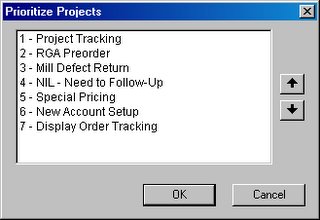
The numbers are the project priorities and the text is the project title. The up and down arrows are used to move things around. Here's what the design looks like:
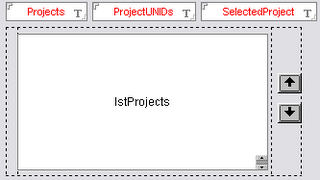
[Sidebar: Lotus Notes cannot produce a graphical button. The up and down arrow buttons were created in VB5 then copied out of a print screen and pasted in. The code referenced below is in the default hotspot on each picture.]
To Move an item up or down we have to do a few things:
And for the down button:
And that's really all there is to it. Once you click OK control returns to the LotusScript action button, which then steps through the UNID's and applyies the new priorities to the documents. Hopefully you can see how simple it is to reorder items in a listbox and how this can be applied to allow documents to be reordered.
All code was converted to HTML using the ls2html routine,
provided by Julian Robichaux at nsftools.com.
SNTT , show-n-tell thursday
The idea I came up with was to provide a dialog that shows all the projects with a priority assigned. The user can select a project, then click an up button to increase the project's priority, or a down arrow to decrease the priority. There are a few caveats to getting this to work:
- Setting the default value on a listbox requires computing the default value from a field.
- Since you are changing the information you want to put on the underlying documents you have to be careful that you give yourself some way to relate the new information to the existing documents

The numbers are the project priorities and the text is the project title. The up and down arrows are used to move things around. Here's what the design looks like:
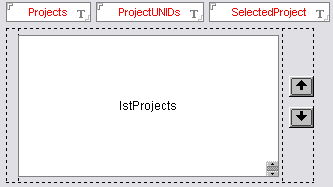
[Sidebar: Lotus Notes cannot produce a graphical button. The up and down arrow buttons were created in VB5 then copied out of a print screen and pasted in. The code referenced below is in the default hotspot on each picture.]
- Projects - Text, multivalue, computed, Default Value is @ThisValue
- ProjectUNIDS - Text, multivalue, computed, Default Value is @ThisValue
- SelectedProject - Text, computed, Default Value is @ThisValue
- lstProjects - Listbox, editable, use formula for choices, formula is Projects. Default Value is SelectedProject.
The remainder of the code deals with reordering the priorities and may be discussed later if readers want to see it. It is beyond the scope of this posting, but I don't mind sharing so ask if you would like to see that, too.Sub Click(Source As Button)
Dim nUIWS As NotesUIWorkspace
Dim nSession As NotesSession
Dim nDB As NotesDatabase
Dim nVW As NotesView
Dim nDC As NotesDocumentCollection
Dim nDoc As NotesDocument
Dim sProjects As String
Dim sUNIDs As String
Set nSession = New NotesSession
Set nDB = nSession.CurrentDatabase
Set nVW = nDB.GetView("(Projects)")
Set nDoc = nVW.GetFirstDocument
Do Until nDoc Is Nothing
sProjects = sProjects & "~" & nDoc.ColumnValues(0) & " - " & nDoc.ColumnValues(1)
sUNIDs = sUNIDs & "~" & nDoc.ColumnValues(2)
Set nDoc = nVW.GetNextDocument(nDoc)
Loop
sProjects = Mid$(sProjects, 2)
sUNIDs = Mid$(sUNIDs, 2)
Set nDoc = nDB.CreateDocument
Call nDoc.ReplaceItemValue("Form", "(Prioritize Projects)")
Call nDoc.ReplaceItemValue("Projects", Split(sProjects, "~"))
Call nDoc.ReplaceItemValue("ProjectUNIDs", Split(sUNIDs, "~"))
Call nDoc.ReplaceItemValue("SelectedProject", nDoc.Projects(0))
Set nUIWS = New NotesUIWorkspace
If nUIWS.DialogBox("(Prioritize Projects)", True, True, False, False, False, False, "Prioritize Projects", nDoc, True, False, True) Then
To Move an item up or down we have to do a few things:
- Get the currently selected element and extract its priority
- Get the next or previous element and extract its priority
- Swap the two priorities
- Swap the UNID's so you can apply the priorities to the correct documents
- Re-select the item with the new priority
selproject := lstProjects;
@If(selproject = "";@Return("");"");

index := @Member(selproject;Projects);
@If(index = 1;@Return("");"");

selpriority := @TextToNumber(@Left(selproject; "-"));
prevproject := Projects[index - 1];

FIELD Projects := @Replace(Projects;selproject; @Text(selpriority - 1) + " - " + @Trim(@Right(selproject;"-")));
FIELD Projects := @Replace(Projects;prevproject; @Text(selpriority) + " - " + @Trim(@Right(prevproject;"-")));
FIELD Projects := @Sort(Projects);

selunid := ProjectUNIDs[index];
prevunid := ProjectUNIDs[index - 1];
FIELD ProjectUNIDs := @Replace(ProjectUNIDs;prevunid; "¥" + selunid);
FIELD ProjectUNIDs := @Replace(ProjectUNIDs;selunid; prevunid);
FIELD ProjectUNIDs := @Replace(ProjectUNIDs; "¥" + selunid; selunid);

@Command([ViewRefreshFields]);

FIELD SelectedProject := @Text(selpriority - 1) + " - " + @Trim(@Right(selproject;"-"));
FIELD lstProjects := SelectedProject;
And for the down button:
selproject := lstProjects;
@If(selproject = "";@Return("");"");

index := @Member(selproject;Projects);
@If(index = @Count(Projects);@Return("");"");

selpriority := @TextToNumber(@Left(selproject; "-"));

FIELD Projects := @Replace(Projects;selproject; @Text(selpriority + 1) + " - " + @Trim(@Right(selproject;"-")));
FIELD Projects := @Replace(Projects;Projects[index + 1]; @Text(selpriority) + " - " + @Trim(@Right(Projects[index + 1];"-")));
FIELD Projects := @Sort(Projects);

selunid := ProjectUNIDs[index];
nextunid := ProjectUNIDs[index + 1];
FIELD ProjectUNIDs := @Replace(ProjectUNIDs;nextunid; "¥" + selunid);
FIELD ProjectUNIDs := @Replace(ProjectUNIDs;selunid; nextunid);
FIELD ProjectUNIDs := @Replace(ProjectUNIDs; "¥" + selunid; selunid);

@Command([ViewRefreshFields]);

FIELD SelectedProject := @Text(selpriority +1) + " - " + @Trim(@Right(selproject;"-"));
FIELD lstProjects := SelectedProject;
And that's really all there is to it. Once you click OK control returns to the LotusScript action button, which then steps through the UNID's and applyies the new priorities to the documents. Hopefully you can see how simple it is to reorder items in a listbox and how this can be applied to allow documents to be reordered.
provided by Julian Robichaux at nsftools.com.
SNTT , show-n-tell thursday
Monday, September 11, 2006
My first Windows XP 64-bit computer
I've always built my own computers, and in 2001 I put together an Athlon 1.1Ghz machine on an FIC AD11 motherboard. I put in a geForce 4 TI-4400 256MB video card and 512MB ECC PC2100 RAM. It has served me very well for the past five years. However I need more memory but can't find compatible modules, the fan on the video card died a few months ago and can't be replaced, and the 400W power supply is extremely loud and getting on my nerves. I also need a DVD drive but my current case is out of 5.25" bays. So I decided it was time to upgrade. This time I considered some pre-built computers, but to get the features I wanted was going to cost me over $1,200 and still not be exactly what I wanted:
Must haves:
The Asus M2NPV-VM has 4 SATA2 ports, the most I found on any micro-ATX motherboard, and has pretty much everything built in: geForce graphics, gigabit Ethernet, 7.1 audio, support for up to DDR2-800, and support for Athlon FX2 CPU's. I started out mid-level and now I have a lot of headroom to upgrade into.
I purchased everything here except the Antec Aria case from Mwave.com. They have fair prices, an excellent selection, and are extremely easy to do business with. I have been ordering from them for years and never had any problems. The Aria is an older case and relatively hard to find. I got mine from eBay for about $60, not including shipping.
Must haves:
- Quiet
- PCI-E 16X
- DDR2 support
- DVD±RW
- Upgradeable
- Small form factor
- Built-in card reader
- LightScribe DVD
- 64-bit
- Stylish
- Antec Aria case
- Asus M2NPV-VM motherboard
- Sony DWQ-120A 16X Super All-Write DVD±RW
- AMD Athlon 64 3500+ (Orleans)
- 2GB DDR2-533 RAM
- Windows XP Professional 64-bit
The Asus M2NPV-VM has 4 SATA2 ports, the most I found on any micro-ATX motherboard, and has pretty much everything built in: geForce graphics, gigabit Ethernet, 7.1 audio, support for up to DDR2-800, and support for Athlon FX2 CPU's. I started out mid-level and now I have a lot of headroom to upgrade into.
I purchased everything here except the Antec Aria case from Mwave.com. They have fair prices, an excellent selection, and are extremely easy to do business with. I have been ordering from them for years and never had any problems. The Aria is an older case and relatively hard to find. I got mine from eBay for about $60, not including shipping.
Friday, September 01, 2006
DXL vs CSS
While I'm getting started with DXL, I wanted to see if I could start a discussion about where DXL ends and CSS begins. I understand that DXL can do a lot more than just update design elements, but shouldn't style be the purview of CSS? Jeff Eisen recently blogged about changing UI elements in Hannover with CSS. Mary Beth Raven picked this up and gave a little more information about how themes might be implemented in Hannover.
So what do you think? Is DXL really viable long-term for UI updating, or should we hold out for CSS? I'll still continue with my DXL UI Skinner, since it will apply to R7 and ND6/6.5, but I would be interested to see if anyone has insight or even an opinion on where this is headed.
So what do you think? Is DXL really viable long-term for UI updating, or should we hold out for CSS? I'll still continue with my DXL UI Skinner, since it will apply to R7 and ND6/6.5, but I would be interested to see if anyone has insight or even an opinion on where this is headed.
about that DXL UI Skinner
A while back I posted a list of side projects I was working on. Well, none of them have really progressed much since that time. With a three day weekend upon me I decided it might be time to fire things up. So I'm gonna start working on that DXL UI Skinner, and I'll be blogging about my progress over the weekend.
It would be remiss of me if I did not mention the influence of two luminaries in the Domino blogosphere. First up is Rocky Oliver. His Lotusphere 2006 presentation and the accompanying sample database are what started me thinking about DXL. I also want to thank Ben Poole, who made me aware of his Simple DXL processing sample.
With all this work already done this should be a piece of cake! :-)
P.S. As I was collecting all the links for this post I came across another reference from Ben Poole. This concept has some legs, so I'm even more stoked about getting to work on it. Some of the comments have me a little concerned, but I'll do what I can.
It would be remiss of me if I did not mention the influence of two luminaries in the Domino blogosphere. First up is Rocky Oliver. His Lotusphere 2006 presentation and the accompanying sample database are what started me thinking about DXL. I also want to thank Ben Poole, who made me aware of his Simple DXL processing sample.
With all this work already done this should be a piece of cake! :-)
P.S. As I was collecting all the links for this post I came across another reference from Ben Poole. This concept has some legs, so I'm even more stoked about getting to work on it. Some of the comments have me a little concerned, but I'll do what I can.
Tuesday, August 29, 2006
What can IBM do to make Domino development better?
In a recent blog post Ed Brill poses the following question:
In a world where the majority of new applications are being built in Java (and associated languages) and .NET, what approach could IBM use today to attract hoardes of new developers to learn Lotusscript? Isn't this the whole reason that Notes get labelled "proprietary" (in the tone of voice where proprietary = bad)?
"Hannover" will deliver the best of both in that the existing model will continue and be enhanced, yet the client will be open to new Java-based development methods. Thus the inflection point I mentioned earlier.
I don't want to suggest that there's no new Notes developers or development going on -- I get to hear about cool new projects every day -- but clearly it's a different market dynamic for developers today than it was when Notes became mainstream.
It's a tough question, and not one that can be answered without being a bit harsh. The short answer is you can't attract new LotusScript developers. It's a limited-use language with no future. LotusScript is a one trick pony, if you use it you're locking yourself into doing only Notes development, and the future of Notes by no means guaranteed. Using a general-purpose language such as Java or C# gives the developer more marketability.
The other major issue is Domino Designer itself. The IDE lacks features people have taken for granted in other development tools since the early 90's. LotusScript debugging is rudimentary and Formula, Javascript and Java debugging is nonexistent. New features have been tacked on over the past seven or eight years in ways that make them difficult to use. HTML rendering, which was introduced in R4, is STILL messed up. CSS support is spotty at best. A lot of this is supposedly being addressed with Hannover, but I'm not holding my breath. Nearly a decade of promises that it'll get better has left me jaded, and it has run off a number of people who might otherwise have embraced Notes and Domino.
It seems that IBM is forcing Notes developers into Java. That's fine, it's IBM's decision to make. I find it disheartening, but not unexpected. Notes and Domino are at critical inflection points. I appreciate that IBM and Lotus are trying to walk the fine line of delivering future-focused products while not alienating their existing customer base. I also appreciate people such as Ed asking these questions and not shying away from the scrutiny.
In a world where the majority of new applications are being built in Java (and associated languages) and .NET, what approach could IBM use today to attract hoardes of new developers to learn Lotusscript? Isn't this the whole reason that Notes get labelled "proprietary" (in the tone of voice where proprietary = bad)?
"Hannover" will deliver the best of both in that the existing model will continue and be enhanced, yet the client will be open to new Java-based development methods. Thus the inflection point I mentioned earlier.
I don't want to suggest that there's no new Notes developers or development going on -- I get to hear about cool new projects every day -- but clearly it's a different market dynamic for developers today than it was when Notes became mainstream.
It's a tough question, and not one that can be answered without being a bit harsh. The short answer is you can't attract new LotusScript developers. It's a limited-use language with no future. LotusScript is a one trick pony, if you use it you're locking yourself into doing only Notes development, and the future of Notes by no means guaranteed. Using a general-purpose language such as Java or C# gives the developer more marketability.
The other major issue is Domino Designer itself. The IDE lacks features people have taken for granted in other development tools since the early 90's. LotusScript debugging is rudimentary and Formula, Javascript and Java debugging is nonexistent. New features have been tacked on over the past seven or eight years in ways that make them difficult to use. HTML rendering, which was introduced in R4, is STILL messed up. CSS support is spotty at best. A lot of this is supposedly being addressed with Hannover, but I'm not holding my breath. Nearly a decade of promises that it'll get better has left me jaded, and it has run off a number of people who might otherwise have embraced Notes and Domino.
It seems that IBM is forcing Notes developers into Java. That's fine, it's IBM's decision to make. I find it disheartening, but not unexpected. Notes and Domino are at critical inflection points. I appreciate that IBM and Lotus are trying to walk the fine line of delivering future-focused products while not alienating their existing customer base. I also appreciate people such as Ed asking these questions and not shying away from the scrutiny.
Wednesday, August 23, 2006
SNTT - How to create a Windows shortcut from LotusScript using Windows Scripting Host calls
Recently I had a need to deploy a Microsoft Access application to a number of users. I needed to give them each their own copy of the database and give them a shortcut to it. There are a number of ways to achieve this, but I decided the easiest would be to just use some Windows Scripting Host calls. Here is a short snippet of code that will get the location of the currently logged in user's My Documents and Desktop folders, copy a file from a network drive (P in this case) to the My Documents, then create a shortcut to it on the user's desktop.
This LotusScript was converted to HTML using the ls2html routine,
provided by Julian Robichaux at nsftools.com.
SNTT , show-n-tell thursday
Dim sDesktop As String
Dim sMyDocs As String

Dim oShell As Variant
Dim oShortcut As Variant
Dim oFS As Variant

Set oShell = CreateObject("WScript.Shell")
Set oFS = CreateObject("Scripting.FileSystemObject")

sDesktop = oShell.SpecialFolders("Desktop")
sMyDocs = oShell.SpecialFolders("MyDocuments")

'Copy the file
Filecopy "P:\Charles\BPS Barcodes.mdb", sMyDocs & "\BPS Barcodes.mdb"

'Create shortcut
Set oShortcut = oShell.CreateShortcut(sDesktop & "\BPS Barcodes.lnk")
oShortcut.TargetPath = sMyDocs & "\BPS Barcodes.mdb"
oShortcut.Save

Messagebox "Installation successful.", 0, "BPS Barcodes"
provided by Julian Robichaux at nsftools.com.
SNTT , show-n-tell thursday
Thursday, August 10, 2006
SNTT - Notes Community Template Project - Enough of the talk, let's do this
John Head made another posting about the community effort toward providing more and better templates for Notes. The reason we're having this discussion is because IBM is unwilling to invest in this idea and has suggested the Notes community pick up the banner. Bruce Elgort suggested we take the top 20 downloaded templates from OpenNTF and spruce them up. Others have suggested we work from the list of templates from Sharepoint. Since no one has taken the lead I am stepping up. My commitment is to:
SNTT, show-n-tell thursday
- Provide consistent Notes client UI documentation with recommended best practices based on the Notes 7.01 mail template. I don't do web development and would appreciate it if someone could do something similar for web applications. I will be posting my UI guidelines on or about August 26th.
- Provide a framework for deploying these guidelines. The most likely vector for this is the excellent work of the openslice project.
- Provide a best practices document for Notes development that discusses template-driven Notes development.
- Provide nifty modules of code that encapsulate common Notes application functionality.
- Work with any interested OpenNTF contributors who would like to apply these guidelines and framework to their own applications.
SNTT, show-n-tell thursday
Vacation time and happy birthday
I'm leaving on Saturday, August 12th for a well-earned vacation. My partner and I plus four friends are going to Tortola, in the British Virgin Islands. My partner and I traded a few extra timeshare weeks for a three cabins on a catamaran. We're returning on Saturday, August 19th, which is my birthday.
So no blogging or responding to blogs for the next week. Enjoy the silence.
So no blogging or responding to blogs for the next week. Enjoy the silence.
Saturday, August 05, 2006
Side projects in the works
I've taken on a rather ambitious set of side projects that I'll work on as my time and interest permit. If anyone has any strong opinion about which one they would like me to complete first let me know. I'll be sharing source code and writing some how-to articles as I go through each one. The following are in no particular order.
- SQL Query Runner - I spend about 95% of my time digging for data in our ERP system and executing queries to see if the descriptions they provide match the data in the table. I have been using a crippleware utility that will only execute queries that run in under 15 seconds. I'm a developer, I can fix this. I'm going to write my own query execution tool and do it in C#. I end up with a tool I can use and I learn a bit more about C#.
- DXL UI Skinner - A core issue that keeps resurfacing in recent blog buzz is about how difficult it can be to deliver a consistent UI across Notes applications. Templates and UI guidelines are a great start, but the first time you customize a Notes UI element you can no longer synchronize it with a template. Sure you could create a separate template for every design element, but who really has the time for that? My idea is to use DXL to apply UI updates to customized design elements. I know it's been done before but I haven't found a utility that will do it, so once I get mine done I'll put it up on OpenNTF. First up will be form and view action bars and view column headers. If there are any specific design elements or properties you'd like to be able to update en masse let me know.
- Barracuda Spam Statistics - We use a Barracuda Networks Spam Firewall 300 to filter inbound mail. It works extremely well, we block 85% of all inbound mail with very few legitimate false positives. (Users think the chain letters from their friends are legitimate, I take a different view.) It generates statistics and sends reports via e-mail, which I route to a mail-in database, parse through them, and collect statistics so I can have some idea of how much spam we're getting. Right now I'm only collecting summary traffic data. I will be expanding this to include the rest of the Barracuda reports: top spam senders, top spam recipients, top mail recipients, and top viruses. The Barracuda also exposes a CGI interface for getting access to more information, so the next step after I get the reports parsed will be to research the CGI options.
- DNS server - Believe it or not, where I work we do not have an internal DNS server. Now that I'm getting more comfortable with linux I'm going to dive in and set one up. I only need to serve two domains and it will only be internal traffic, so I don't anticipate it being too difficult.
Friday, August 04, 2006
SNTT - iSeries to RHEL migration - Getting Domino Web Access to work
As I previously posted, moving Domino from one server platform to another is a relatively simple process: just install the same version of Domino then copy the entire Domino data directory from the old server to the new one. When you do this from an iSeries to RHEL you have to take into consideration that linux is case sensitive while the iSeries largely is not.
I ran into this after I moved my mail over and Domino Web Access wasn't working. After extensive troubleshooting I finally posted on Notes.Net and a helpful person there jogged my memory that led me down a path that yielded a resolution. A number of directories on the iSeries are in all upper case, but RHEL expects them to be lower case. Here's how I fixed it:
SNTT
I ran into this after I moved my mail over and Domino Web Access wasn't working. After extensive troubleshooting I finally posted on Notes.Net and a helpful person there jogged my memory that led me down a path that yielded a resolution. A number of directories on the iSeries are in all upper case, but RHEL expects them to be lower case. Here's how I fixed it:
- From the Domino console
tell http quit - From the linux console (I was logged in as root but your notes user should work)
cp -r /local/mail/domino/JAVA /local/mail/domino/java
cp -r /local/mail/domino/TEMPLATES /local/mail/domino/templates
cp -r /local/mail/domino/PLUGINS /local/mail/domino/plugins
cp -r /local/mail/INOTES /local/mail/iNotes
chown -R notes:notes /local/mail (not needed if you're logged in as notes)
rm -rf /local/mail/domino/JAVA
rm -rf /local/mail/domino/TEMPLATES
rm -rf /local/mail/domino/PLUGINS
rm -rf /local/mail/iNotes - From the Domino console
load http
SNTT
Thursday, August 03, 2006
Why I'm migrating from an iSeries to Red Hat
I've taken a few lumps recently about my decision to move from Domino on an iSeries to Red Hat Enterprise Linux (RHEL). My reasons for the migration are as follows:
The decision for the migration has been made, the new hardware has been purchased, and I'm in the process of doing my migration. This is just an explanation of the reasoning that led to the decision.
- It is incredibly expensive. Just getting a baseline iSeries with a single CPU, 2GB RAM and 150GB storage is going to run you over $20K. In my case upgrading from 1GB RAM to 4GB and 5 drives to 8 drives was going to cost over $10K. This was in addition to the $40K we had already paid for the box.
- OS/400 an arcane beast and finding good information is extremely difficult. I have a cursory understanding of how it fits together, but after eight years working with it I'm still mostly clueless! It just runs, which is good, but when there are problems I haven't the foggiest idea where to go to figure out what is going on. I end up spending lots of time on the phone with IBM support. They're good, but I would really appreciate something a little more approachable with better documentation.
- Upgrading was a pain. Each release of Domino came with it a list of the patches you had to have on your iSeries, as well as what version of OS/400 you needed. Verifying the patches was a tedious process, installing new ones took even longer, and heaven forbid you actually had to get an OS upgrade to install Domino. Domino 7 requires i5/OS 5.3, which our iSeries won't support, so we could not upgrade to Domino 7.
- IBM doesn't seem to know what to do with the AS/400 / iSeries / System i5. They keep renaming, rebranding and remarketing it. The latest push has been to use the iSeries to run linux. I just don't see that IBM is really moving the platform forward.
The decision for the migration has been made, the new hardware has been purchased, and I'm in the process of doing my migration. This is just an explanation of the reasoning that led to the decision.
Tuesday, August 01, 2006
The Notes community's involvement
Recently Ed Brill posted an article about a prominent Australian company dumping Domino in favor of Exchange. This sparked a disucssion which led to a lot of people saying the problem was Notes didn't ship with enough canned templates.
Personally I've never used any Notes templates other than the standard ones for administration databases. I created exactly one each of discussion databases, document libraries, team rooms, and database libraries. I tried to wade through the code, found it more confusing than helpful, and went off on my own... and never looked back. In my seven years developing Notes applications I have shared databases with a colleague who works in the same industry, but I have not ever used anything from OpenNTF, the Sandbox or any of the updated templates provided in newer releases of Notes.
I'm telling you all that to give you some background in where I'm going with this. John Head took up the torch from Ed's blog posting and suggested that maybe it's time for the community to step up and fill the need for more templates. On the surface that's a great idea.
The early dialog centered around duplicating the templates provided by Microsoft as part of Sharepoint Portal. My concern was that this was headed in the direction of serving as nothing more than a marketing tool for business partners to sell more of their own services. The templates would be little more than a slick UI with little behind it, leading to my analogy of a Potemkin's village of templates.
For me to get fully on board with this it has to provide fully functional applications, not just proofs of concept. In this vein Bruce Elgort suggested we take the top 20 downloaded OpenNTF templates and bring them up to speed. I think that's a fantastic idea, and I'm on board with it. It's certainly more productive than endless hours of Guild Wars. :-)
Personally I've never used any Notes templates other than the standard ones for administration databases. I created exactly one each of discussion databases, document libraries, team rooms, and database libraries. I tried to wade through the code, found it more confusing than helpful, and went off on my own... and never looked back. In my seven years developing Notes applications I have shared databases with a colleague who works in the same industry, but I have not ever used anything from OpenNTF, the Sandbox or any of the updated templates provided in newer releases of Notes.
I'm telling you all that to give you some background in where I'm going with this. John Head took up the torch from Ed's blog posting and suggested that maybe it's time for the community to step up and fill the need for more templates. On the surface that's a great idea.
The early dialog centered around duplicating the templates provided by Microsoft as part of Sharepoint Portal. My concern was that this was headed in the direction of serving as nothing more than a marketing tool for business partners to sell more of their own services. The templates would be little more than a slick UI with little behind it, leading to my analogy of a Potemkin's village of templates.
For me to get fully on board with this it has to provide fully functional applications, not just proofs of concept. In this vein Bruce Elgort suggested we take the top 20 downloaded OpenNTF templates and bring them up to speed. I think that's a fantastic idea, and I'm on board with it. It's certainly more productive than endless hours of Guild Wars. :-)
Subscribe to:
Posts (Atom)